Experiment Value Estimator agent
Experiment Value Estimator is an agent in Mark (Optimizely Agent Platform). It generates a stakeholder-ready report with the projected annualized impact of rolling out a winning experiment variation.
- Challenge – Communicating the business impact of a winning experiment is difficult. You often struggle to translate experiment test results into concrete, stakeholder-ready numbers that justify the investment. Lift percentages and statistical significance do not map directly to revenue.
- Agent outcome – The agent generates a report with the projected annualized impact of rolling out a winning experiment variation. It takes your experiment test results (conversion rates, traffic, duration, and value per conversion). It produces a shareable projection of the revenue or business value your winning test delivers.
- Value –
- Quantifies the return on investment (ROI) of experimentation in dollar terms stakeholders understand.
- Removes the guesswork from post-experiment reporting.
- Gives you copy-ready Slack and email blurbs to share the result with stakeholders.
- Includes an optional conservative discount factor to anchor stakeholders on a realistic, defensible number.
Required Optimizely products
The Experiment Value Estimator agent requires Optimizely Web Experimentation or Optimizely Feature Experimentation.
Install agent
Note
Mark Administrators, Agent Builders, and users with the Add, edit, and install specialized agents attribute for a custom role can add agents to their organization's Mark instance. See Add users and set permissions.
Install the agent from the Directory.
- Go to Directory > Agents.
- (Optional) Enter Experiment Value Estimator or use the drop-down list filters to narrow the list.
- Click Install on Experiment Value Estimator to add it to your Mark instance.
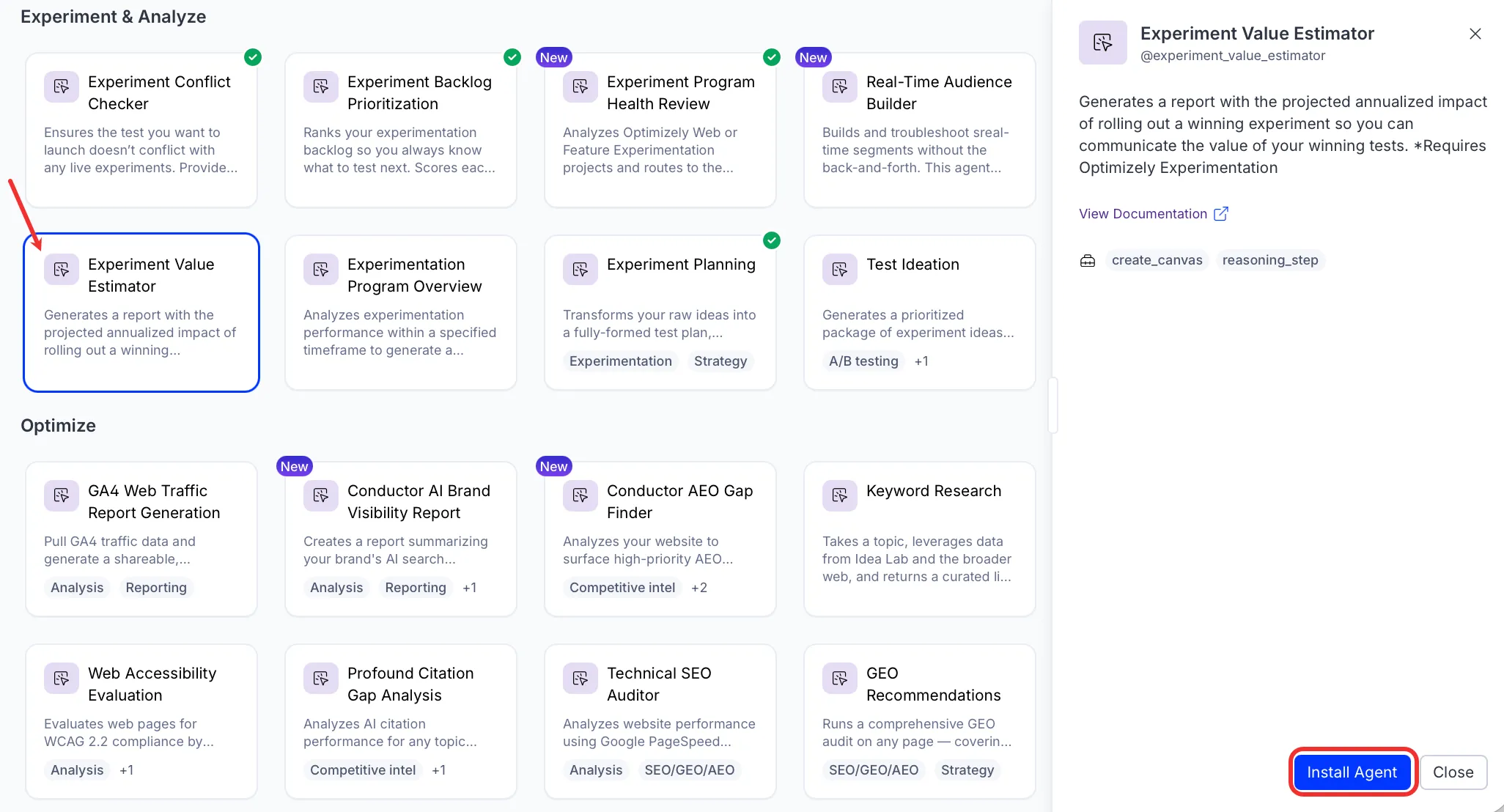
If Install is disabled, connect the required Optimizely products to your Mark instance first.
Use the agent
In Mark chat, enter @experiment_value_estimator and provide the following details:
- Primary Metric Name – The primary success metric to measure. For example, Form Success, Add to Cart, or Trial Signup.
- Conversion Unit – The plain-English name for each conversion. The agent uses it in labels and share blurbs. For example, lead, signup, order, subscription, or conversion.
- Variation Visitors – Number of visitors exposed to the variation during the test (not total experiment traffic). For example, 139795.
- Control Conversion Rate – Conversion rate for the control, entered as a percentage value. For example, 2.73 means 2.73% (not 0.0273).
- Variation Conversion Rate – Conversion rate for the variation, entered as a percentage value. For example, 2.87 means 2.87% (not 0.0287).
- Statistical Significance – Statistical significance or confidence level, entered as a percentage. For example, 93 means 93%.
- Duration in Days – Number of days the experiment ran. For example, 319.
- Value Per Conversion – Dollar value of a single conversion, entered as a number (no $ sign or comma). For example, 70 for $70 per lead.
- (Optional) Conservative Discount Factor – Conservative haircut applied to the annualized projection, entered as a percentage. Reduces the headline projected annual value by this amount. For example, 10 means the agent projects 90% of the calculated annual value. A $1,000,000 annualized projection becomes $900,000. Default is 0 (no discount).
The Experiment Value Estimator agent generates a stakeholder-ready Hypertext Markup Language (HTML) impact report in a canvas, showing observed incremental value, projected annual impact, confidence analysis, and copy-ready share blurbs for Slack and email.
To use the Experiment Value Estimator agent in a workflow agent, add it to your workflow. See Create a workflow agent.
Default agent details
These are the default details for the Experiment Value Estimator agent. After you install the agent in your Mark instance, customize these details for your organization's needs. See Manage agents for instructions.
Input variables
The Experiment Value Estimator agent takes the following input:
- Primary Metric Name
- Conversion Unit
- Variation Visitors
- Control Conversion Rate
- Variation Conversion Rate
- Statistical Significance
- Duration in Days
- Value Per Conversion
- (Optional) Conservative Discount Factor
Tools
The Experiment Value Estimator agent uses the following tools internally to process your request:
- create_canvas
- reasoning_step
Default configuration
The agent uses the following default configuration:
- Inference level – Pro, which provides maximum reasoning depth.
- Files – None.
- Output – Text.
Note
If you use Opti ID, administrators can turn off generative AI in the Opti ID Admin Center. See Turn generative AI off across Optimizely applications.