Experiment Program Value Analysis agent
Experiment Program Value Analysis is an Optimizely Opal agent that generates an executive value report from Optimizely Program Reporting for Experimentation.
- Challenge – Stakeholders struggle to quantify financial gains, losses avoided, and overall business value across an experimentation program.
- Agent outcome – The agent generates an interactive HTML Canvas report that estimates positive gain, loss avoided, reach, rollout-adjusted value, and experiment attribution.
- Value – The agent communicates the return on investment of experimentation to executive leaders without manual calculations. It generates the report in minutes, not hours.
Required Optimizely products
The Experiment Program Value Analysis agent requires Optimizely Feature Experimentation or Optimizely Web Experimentation.
Install agent
Note
Opal Administrators, Agent Builders, and users with the Add, edit, and install specialized agents attribute for a custom role can add agents to their organization's Optimizely Opal instance. See Add users and set permissions.
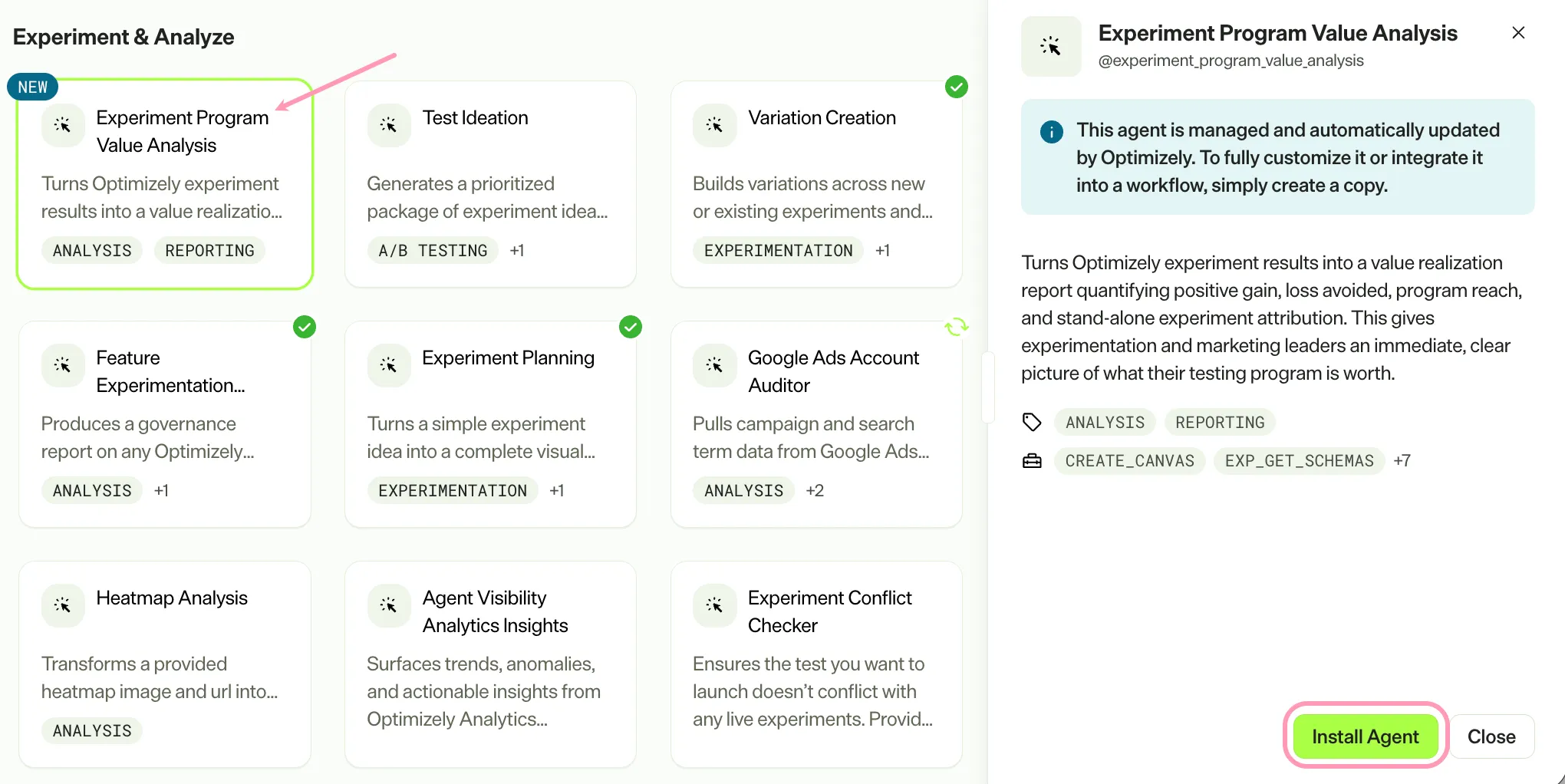
Install the agent from the Opal Agent Directory.
- Go to Agents > Agent Directory.
- Select Experiment Program Value Analysis.
- Click Install Agent to add the agent to your Opal instance.
Use the agent
In Opal Chat, enter @experiment_program_value_analysis.
The agent delivers an interactive HTML Canvas report with executive metrics, program value, KPI tiles, and experiment value attribution.
To use the Experiment Program Value Analysis agent in a workflow agent, drag and drop the agent into your workflow. See Create a workflow agent.
Details
The following are the default details for the Experiment Program Value Analysis agent. After you install the agent in your Opal instance, customize these details for your organization's needs.
See Manage agents for instructions.
Input variables
None.
Tools
The Experiment Program Value Analysis agent uses the following tools to process your request:
- create_canvas
- exp_get_schemas
- exp_execute_query
- exp_program_reporting_execute_query
- exp_program_reporting_win_rate
- exp_program_reporting_top_experiments
- exp_program_reporting_underperforming_experiments
- exp_list_ui_cards
- exp_show_ui_card
Additional details
The agent uses the following default configuration:
- Inference level – Pro, which provides maximum reasoning depth.
- Files – None.
- Output – Text.
Note
If you use Opti ID, administrators can turn off generative AI in the Opti ID Admin Center. See Turn generative AI off across Optimizely applicationsTurn generative AI off across Optimizely applications.