Experiment Program Health Review agent
Experiment Program Health Review is an Optimizely Opal agent that analyzes Optimizely Web Experimentation or Optimizely Feature Experimentation projects and routes to the correct interactive dashboard for each program type.
- Challenge – Experimentation programs generate large volumes of data. Translating that data into a clear, program-level story takes time and effort. Teams lack a single view that surfaces what is working, what is not, and where to focus next across Web Experimentation and Feature Experimentation.
- Agent outcome – The agent analyzes your Experimentation project data and routes you to the dashboard that matches your program type. Both dashboards are ready to share.
- Value – The agent removes the manual effort of piecing together program performance across experiments. Teams and stakeholders get a clear, structured view of experimentation health, which supports faster, more confident decisions about where to invest next.
Required Optimizely products
Web Experimentation or Feature Experimentation.
Install agent
Note
Opal Administrators, Agent Builders, and users with the Add, edit, and install specialized agents attribute for a custom role can add agents to their organization's Optimizely Opal instance. See Add users and set permissions.
Install the agent from the Opal Agent Directory.
- Go to Agents > Agent Directory.
- Select Experiment Program Health Review.
- Click Install Agent to add it to your Opal instance.
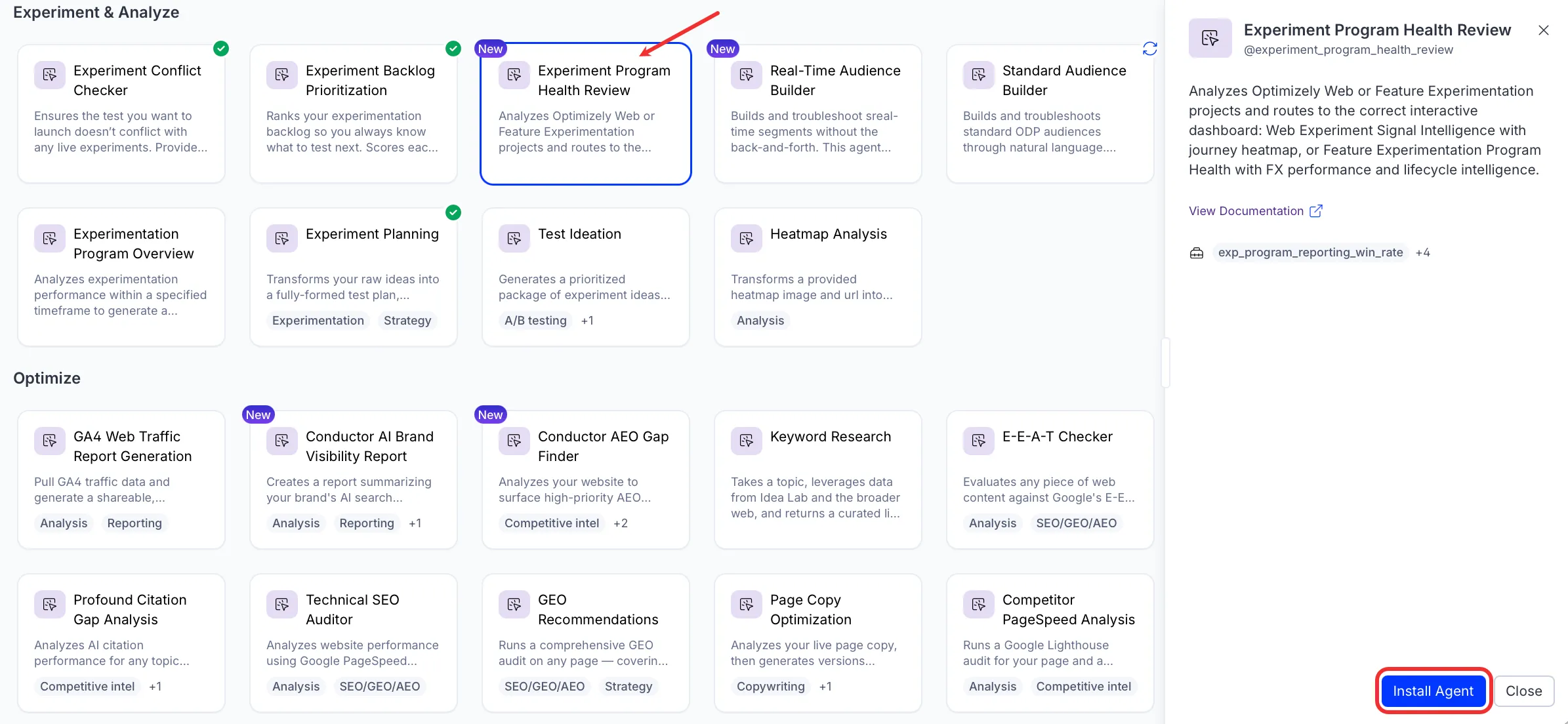
If Install Agent is disabled, connect the required Optimizely products to your Opal instance first.
Use the agent
In Opal Chat, enter @experiment_program_health_review and provide the following details:
- project_id – Turns your program data into a ready-to-share dashboard that tells the story of what is working, what is not, and where to focus next.
- (Optional) timeframe_months – The number of months of experimentation data to analyze. Defaults to 12.
The Experiment Program Health Review agent returns a canvas. Web Experimentation projects receive an Experiment Signal Intelligence Dashboard with a journey heatmap. Feature Experimentation projects receive a Program Health Dashboard with lifecycle and performance intelligence.
To use the Experiment Program Health Review agent in a workflow agent, drag and drop it into your workflow. See Create a workflow agent.
Details
These are the default details for the Experiment Program Health Review agent. After you install the agent in your Opal instance, customize these details for your organization's needs. See Manage agents for instructions.
Input variables
The Experiment Program Health Review agent takes the following input:
- project_id
- (Optional) timeframe_months
Tools
The Experiment Program Health Review agent uses the following tools internally to process your request:
- exp_program_reporting_win_rate
- exp_program_reporting_top_experiments
- exp_execute_query
- exp_get_schemas
- create_canvas
Additional details
The agent uses the following default configuration:
- Inference level – Pro. Provides maximum reasoning depth.
- Files – None.
- Output – Text.
Note
If you use Opti ID, administrators can turn off generative AI in the Opti ID Admin Center. See Turn generative AI off across Optimizely applicationsTurn generative AI off across Optimizely applications.