Page Performance Evaluation agent
Page Performance Evaluation is an agent in Mark (Optimizely Agent Platform). It runs a full Google Lighthouse audit on any live URL. The audit covers Performance, search engine optimization (SEO), Accessibility, and Best Practices. The agent then cross-references findings against a visual screenshot. This step pinpoints root causes and delivers specific, ranked fixes with real metric values.
- Challenge – Teams struggle to diagnose why pages underperform. Audit tools surface scores but rarely connect them to root causes, and automated checks miss visual issues entirely.
- Agent outcome – It produces a side-by-side view of Lighthouse scores and screenshot findings, identifies root causes, and ranks fixes by impact.
- Value – The agent eliminates guesswork by pinpointing exactly what to fix and why. Teams prioritize the improvements with the most impact on page speed, search visibility, and user experience.
Install agent
Note
Mark Administrators, Agent Builders, and users with the Add, edit, and install specialized agents attribute for a custom role can add agents to their organization's Mark instance. See Add users and set permissions.
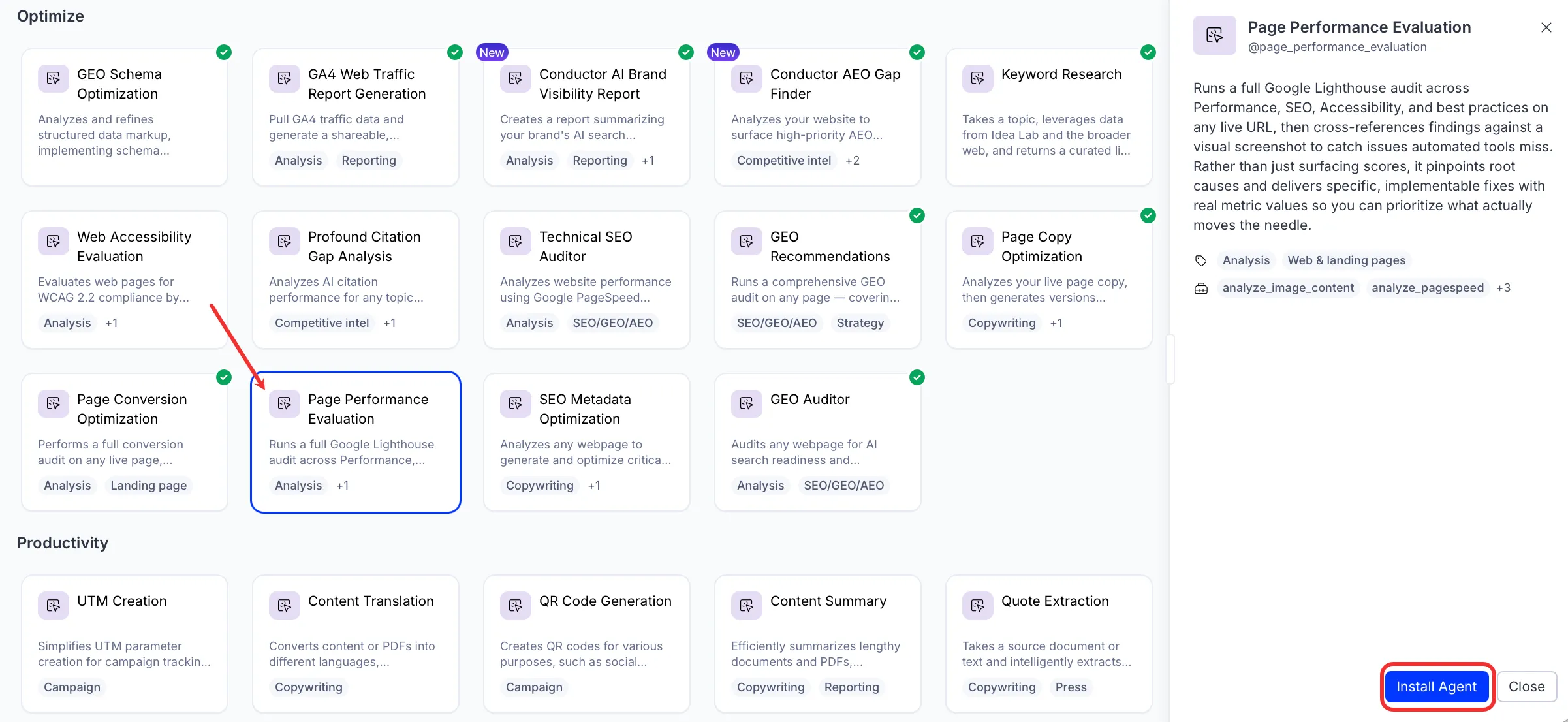
Install the agent from the Directory.
- Go to Directory > Agents.
- (Optional) Enter Page Performance Evaluation or use the drop-down list filters to narrow the list.
- Click Install on Page Performance Evaluation to add it to your Mark instance.
Use the agent
In Mark chat, enter @page_performance_evaluation and provide the following details:
- Page URL – Enter the URL of your page.
- (Optional) Additional Details – Additional instructions, such as mobile assessment only.
The agent delivers a performance report as a canvas. The report covers scores across all four categories, root-cause findings, and a prioritized fix list.
To use the Page Performance Evaluation agent in a workflow agent, add it to your workflow. See Create a workflow agent.
Default agent details
These are the default details for the Page Performance Evaluation agent. After you install the agent in your Mark instance, customize these details for your organization's needs. See Manage agents for instructions.
Input variables
The Page Performance Evaluation agent takes the following input:
- Page URL
- (Optional) Additional Details
Tools
The Page Performance Evaluation agent uses the following tools internally to process your request:
- analyze_image_content
- analyze_pagespeed
- create_canvas
- reasoning_step
- take_webpage_screenshot
Default configuration
The agent uses the following default configuration:
- Inference level – Standard, which provides fast responses.
- Files – None.
- Output – Text.
Note
If you use Opti ID, administrators can turn off generative AI in the Opti ID Admin Center. See Turn generative AI off across Optimizely applications.