Content Ideation agent
Content Ideation is an Optimizely Opal agent that generates 10 content and campaign ideas for a topic, audience, or quarter. The agent combines live trend research and competitor intelligence.
- Challenge – Generating content ideas that align with business goals, audience interests, and keyword opportunities is slow. Manual brainstorming cannot sustain a steady pipeline of differentiated ideas.
- Agent outcome – Returns 10 content ideas, each with a recommended angle, format, and rationale, and surfaces a single top idea with ranking reasoning.
- Value – A fuller content pipeline, more consistent publishing, and ideas grounded in audience relevance and search opportunity.
Install the agent
Note
Opal Administrators, Agent Builders, and users with the Add, edit, and install specialized agents attribute for a custom role can add agents to their organization's Optimizely Opal instance. See Add users and set permissions.
Install the agent from the Opal Agent Directory.
- Go to Agents > Agent Directory.
- Select Content Ideation.
- Click Install Agent to add the agent to your Opal instance.
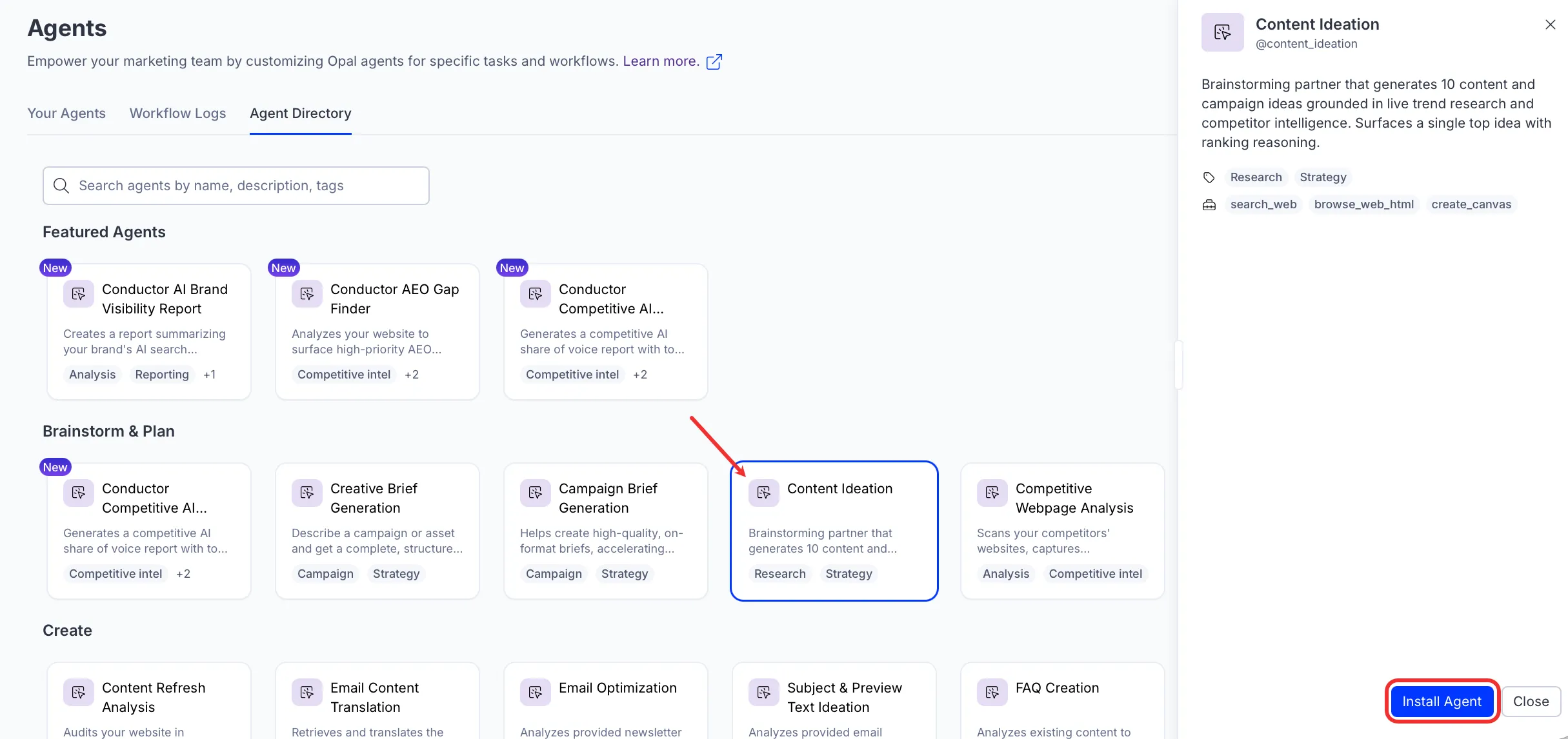
Use the agent
To use the Content Ideation agent in Opal Chat, enter @content_ideation and provide the following details:
- Topic or theme – Core topic, product area, or campaign theme.
- Target Audience – Role, industry, or persona.
- (Optional) Channels / Format Constraints – The channels you are creating for and any production limits, for example LinkedIn and X only, no filming – graphic and text only, or all content types. The agent uses this to recommend formats and estimate production effort.
- (Optional) Quarter or Time period – Season or quarter for timely hooks.
- (Optional) Competitor Websites – Competitor domains to identify content gaps.
The agent returns a numbered list of 10 content ideas. Each idea includes a title, recommended format, target angle, and rationale. The agent also surfaces a single top idea and explains its ranking.
To use the Content Ideation agent in a workflow agent, drag and drop it into your workflow. See Create a workflow agent.
Details
The Content Ideation agent ships with the following default configuration. After you install the agent in your Opal instance, customize these details for your organization's needs. See Manage agents for instructions.
Input variables
The Content Ideation agent takes the following input:
- Topic or theme
- Target Audience
- (Optional) Channels / Format Constraints
- (Optional) Quarter or Time period
- (Optional) Competitor Websites
Tools
The Content Ideation agent uses the following tools internally to process your request:
- search_web
- browse_web_html
Additional details
The agent uses the following default configuration:
- Inference level – Pro. Provides maximum reasoning depth.
- Files – None.
- Output – Text.
Note
If you use Opti ID, administrators can turn off generative AI in the Opti ID Admin Center. See Turn generative AI off across Optimizely applicationsTurn generative AI off across Optimizely applications.