GEO Schema Optimization agent (CMS SaaS)
GEO Schema Optimization is an Optimizely Opal agent that analyzes page content and generates or refines JSON-LD schema markup directly within Optimizely Content Management System (SaaS) to improve search engine comprehension and AI search visibility.
- Challenge – Ensuring that Generative Engine Optimization (GEO)-specific content is correctly structured with schema markup can be complex, often leading to under-optimized local search performance and missed opportunities for rich search results.
- Agent outcome – The agent analyzes your CMS (SaaS) content and external URLs for GEO-related schema, identifies gaps, and automatically adds or populates JSON-LD with accurate, real content to enhance local SEO.
- Value – Improves visibility in local search results, increases the likelihood of displaying in rich snippets, and drives more relevant local traffic.
Required Optimizely products
Optimizely Content Management System (SaaS)
Install agent
Note
Opal Administrators, Agent Builders, and users with the Add, edit, and install specialized agents attribute for a custom role can add agents to their organization's Optimizely Opal instance. See Add users and set permissions.
Install the agent from the Opal Agent Directory.
- Go to Agents > Agent Directory.
- Select GEO Schema Optimization.
- Click Install Agent to add it to your Opal instance.
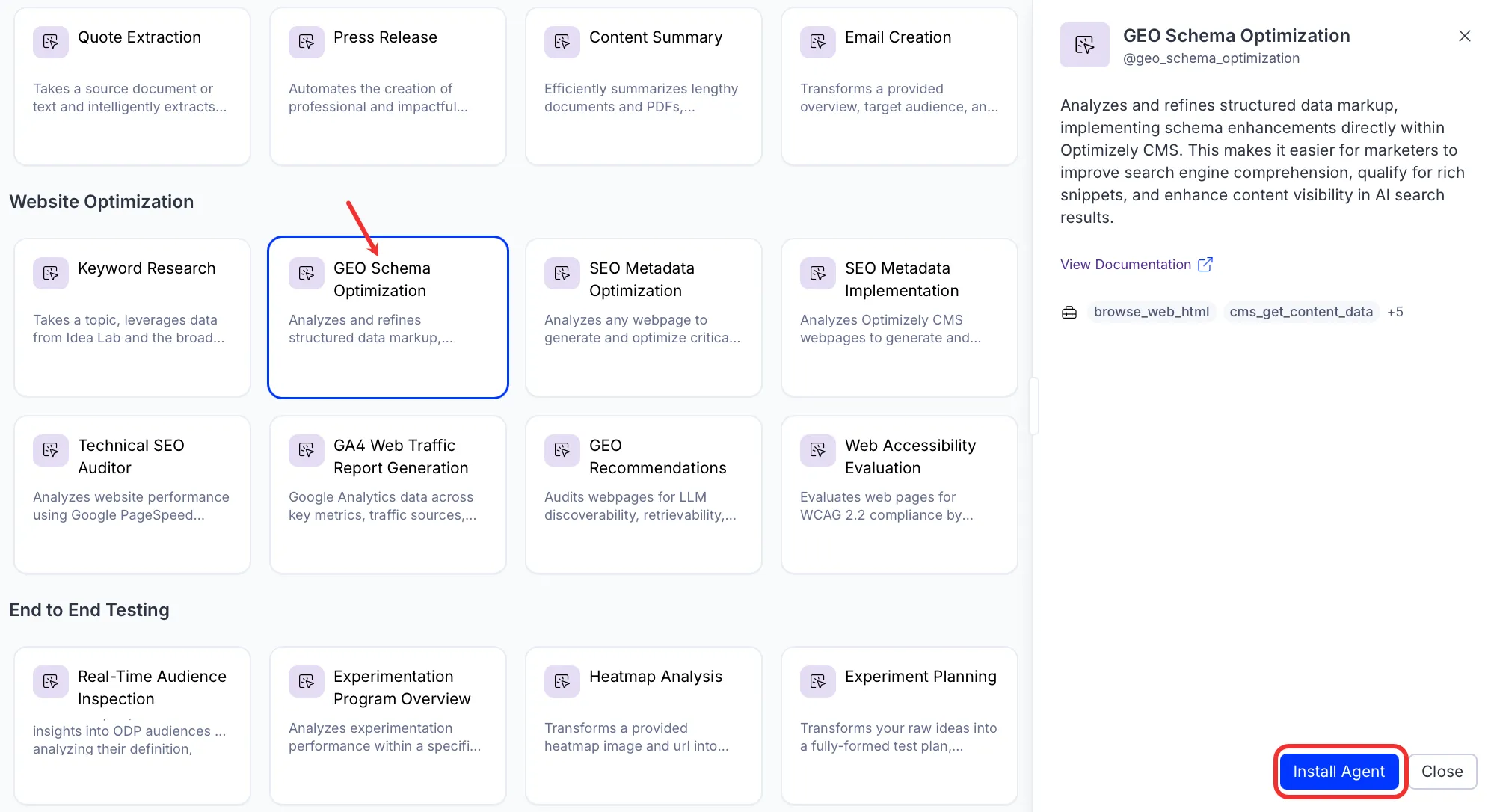
If Install Agent is in a disabled state, ensure the Required Optimizely products are connected to your Opal instance.
Use the agent
In Opal Chat, enter @geo_schema_optimization and provide the following details:
- ContentKey – Enter the content key for the current CMS (SaaS) page.
- ContentVersion – Enter the version of the current CMS (SaaS) page.
- PreviewURL – Enter the preview URL for the current CMS (SaaS) page.
- (Optional) SchemaProperty – Enter the schema property from CMS (SaaS), if available.
The agent analyzes the page content, generates or refines JSON-LD schema markup, and updates the schema property in CMS (SaaS) directly.
To use the GEO Schema Optimization agent in a workflow agent, drag and drop it into your workflow. See Create a workflow agent
Details
These are the default details for the GEO Schema Optimization agent. After you install the agent in your Opal instance, customize these details for your organization's needs. See Manage agents for instructions.
Input variables
The GEO Schema Optimization agent takes the following input:
CMS (SaaS) automatically shares the input variables with Opal when using Opal Chat from within CMS (SaaS).
When using Opal Chat from the Opal app interface, enter these values directly.
- ContentKey
- ContentVersion
- PreviewURL
- (Optional) SchemaProperty
Tools
The GEO Schema Optimization agent uses the following tools internally to process your request:
- browse_web_html
- cms_get_content_data
- cms_get_content_type_details
- cms_create_content_type
- cms_update_content_type
- cms_update_content_item
- cms_create_content_item
Additional details
The agent uses the following default configuration:
- Inference level – Complex. Provides advanced reasoning and detail.
- Files – None.
- Output – Text.
Note
If you use Opti ID, administrators can turn off generative AI in the Opti ID Admin Center. See Turn generative AI off across Optimizely applicationsTurn generative AI off across Optimizely applications.