Activate widgets
1 min
The following are key concepts within Optimizely Personalization:
- Tracking types, define visitor actions that can be tracked, see Track and recommendTrack and recommend
- Widgets, displays recommendations based on tracking type calculations, see RecommendationsRecommendations.
When a new environment is set up, it has the following Optimizely Commerce Connect-specific widgets. Widgets are only configured for five of the eleven tracking types. See TrackingTypes in the Commerce Connect class library for the full list.
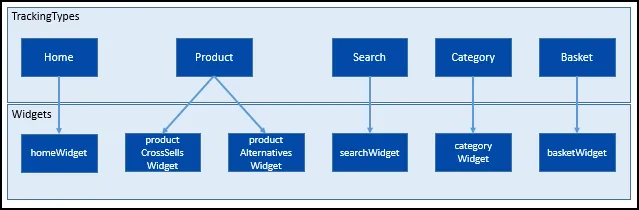
defaultwidgets.png
In a new environment, all widgets are inactive. Before you can track and receive recommendations, you must activate them by using the WidgetService within EPiServer.Personalization.Commerce.
Sample code is provided in the SiteInitialization.cs file in the Commerce Connect sample site source code. See Quicksilver on GitHub.
var widgetService = context.Locate.Advanced.GetInstance<WidgetService>();
    var response = widgetService.GetWidgets();

    foreach (var widget in response.EpiPerPage.Pages.SelectMany(x => x.Widgets))
      {
        widget.Active = true;
        widgetService.UpdateWidget(widget);
      }