Extend the Tasks pane with custom queries
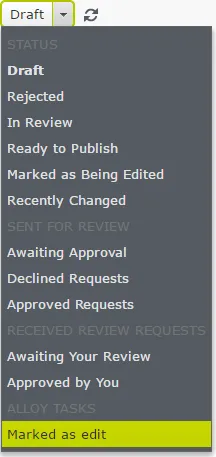
The Tasks panel contains predefined lists with queries like Drafts, Rejected, or Recently Changed. You can also build a query and plug it into the tasks list.
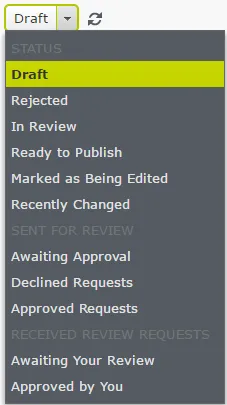
To add a query, implement IContentQueryInterface or inherit from one of the base classes that already have this interface (ContentQueryBase, ContentActivitiesQueryBase).
public class CustomQuery : ContentQueryBase {
  // …
}
Register the query in the IOC container under IContentQuery type (using ServiceConfiguration attribute).
[ServiceConfiguration(typeof(IContentQuery))]
public class CustomQuery : ContentQueryBase {
  // …
}
Then, implement a few properties:
- Name – unique name for the query.
- DisplayName – label displayed in drop-down list, used for grouping queries in the list.
- SortOrder – defines the position on the list.
- VersionSpecific – determines whether to treat query results as version-specific when comparing links.
- PluginAreas – to make the query visible in the tasks list, set PluginAreas to EPiServer.Shell.ContentQuery.KnownContentQueryPlugInArea.EditorTasks string constant.
public override IEnumerable<string> PlugInAreas = new string[] { KnownContentQueryPlugInArea.EditorTasks };Implement a custom query
Create a query to display pages that were manually marked as being edited.
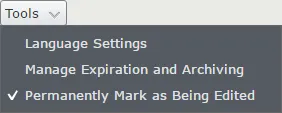
There is a repository registered under the IInUseNotificationRepository interface that returns its content in GetContentMethod.
[ServiceConfiguration(typeof (IContentQuery))]
public class MarkAsEditedQuery: ContentQueryBase {
  private readonly IContentRepository contentRepository;
  private readonly IInUseNotificationRepository inUseNotificationRepository;

  public MarkAsEditedQuery(IContentQueryHelper queryHelper, IContentRepository contentRepository,
    IInUseNotificationRepository inUseNotificationRepository): base(contentRepository, queryHelper) {
    this.contentRepository = contentRepository;
    this.inUseNotificationRepository = inUseNotificationRepository;
  }
  public override string Name => "markedAsEdit";
  public override string DisplayName => "Marked as edit";
  public override IEnumerable<string> PlugInAreas => new string[] {
    KnownContentQueryPlugInArea.EditorTasks
  };
  public override int SortOrder => 105;
  public override bool VersionSpecific = rt false;
  protected override IEnumerable<IContent> GetContent(ContentQueryParameters parameters) {
    return inUseNotificationRepository.GetAllInUseNotifications()
      .Where(n => n.AddedManually)
      .Select(c => contentRepository.Get<IContent>(c.ContentGuid));
  }
}
After running the application, place the query under the OTHERS category.
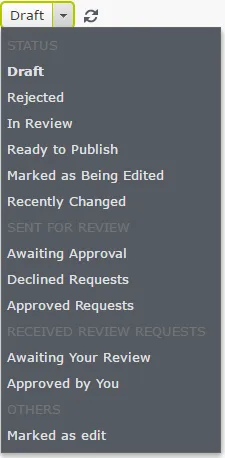
To place it under another category, such as STATUS, add a generic type to ContentQueryBase or add a generic IContentQuery interface.
public class MarkAsEditedQuery : ContentQueryBase<TasksStatusQueryCategory>
    // or
public class MarkAsEditedQuery : ContentQueryBase, IContentQuery<TasksStatusQueryCategory>
Create custom query categories
You can create a query category. Category is a class that implements the IContentQueryCategory interface, and you register it in the IOC container under the IContentQueryCategory type (using ServiceConfiguration attribute).
[ServiceConfiguration(typeof(IContentQueryCategory), Lifecycle = ServiceInstanceScope.Singleton)]
public class AlloyQueryCategory : IContentQueryCategory {
  public string DisplayName => "Alloy tasks";
  public int SortOrder => 100;
}
The class has to implement two properties, DisplayName, which could be the name or key to a localization service, and SortOrder that you use when sorting categories in the list. Instead of using TasksStatusQueryCategory, use the AlloyQueryCategory.