Configure Payment Service
Payment Service is a Commerce Connect feature that integrates the Spreedly payment platform, letting you accept payments through any Spreedly-supported gateway from a single Spreedly Checkout SDK integration. Use Payment Service to add payment gateway providers to your ecommerce site.
Payment Service lets you:
- Use a payment platform without writing custom code.
- Access additional payment gateway options.
- Run multiple payment services on a single website.
For details about the Checkout SDK, see the Spreedly documentation:
Starting with Commerce Connect 15.5.0, the example integration uses the Spreedly Checkout SDK with signed authentication parameters. Earlier versions of the example initialized the Spreedly iFrame with only an environment key, which Spreedly calls non-secure tokenization and is deprecating. If your checkout calls Spreedly.init with only an environment key, update it to match the example integration in the Integrate Payment Service section. For Spreedly's timeline, see iFrame payment form.
Payment Service options
Name | Data type | Description | Required |
|---|---|---|---|
PaymentServiceIsEnabled | Boolean | Whether Payment Service is enabled. | No |
EnvironmentName | String | The Spreedly environment name. Provided by Spreedly when you create an environment. | No |
EnvironmentKey | String | The Spreedly environment key associated with EnvironmentName. | Yes |
GatewayToken | String | Token for the underlying Spreedly gateway that processes the transaction. | Yes |
ScaProviderKey | String | Strong Customer Authentication (SCA) provider key. Required when 3DS is enabled. | Yes, if 3DS is enabled |
ThreeDsIsEnabled | Boolean | Whether 3DS is enabled. | No |
ThreeDsTestMode | Boolean | Whether 3DS is in test mode. | No |
ThreeDsTestCallbackUrl | String | Callback URL used while testing 3DS. The URL must be reachable from the public internet — for example, by exposing localhost through webhook.site. | No |
PaymentServiceUrl | String | URL of the Payment Service endpoint. | Yes |
AuthenticationType | String | Authentication mode. Either HMAC or OBO (on behalf of). | Yes |
AppKey | String | Application key issued by Payment Service. | Yes |
SecretKey | String | Secret key issued by Payment Service. | Yes |
SigningSecret | String | Signing secret used to verify 3DS callbacks. | Yes, if 3DS is enabled |
InstanceIdentifier | String | Instance identifier required for OBO authentication. | Yes, if AuthenticationType is OBO |
Integrate Payment Service
For step-by-step setup instructions, see Configure Payment Service.
To compare your code to a working integration, download the example changed files for Commerce Connect 15.5.0.
Checkout SDK authentication
The Checkout SDK needs signed authentication parameters before it loads the payment fields. Commerce Connect 15.5.0 and later provide them through the GET /api/paymentservice/spreedly/auth endpoint, which SpreedlyAuthController in EPiServer.Commerce.PaymentService implements. The endpoint returns these values:
- environmentKey — The value of the EnvironmentKey option.
- nonce — A unique value for the checkout session.
- timestamp — The current UTC time in ISO 8601 format.
- certificateToken — The same value as environmentKey.
- signature — A SHA-256 hash of the nonce, the timestamp, and the SecretKey option.
If EnvironmentKey is not set, the endpoint returns 400 Bad Request.
The SpreedlyConstants class pins the SDK version and its Subresource Integrity (SRI) hash in CheckoutSdkVersion, CheckoutSdkUrl, and CheckoutSdkIntegrity. Use these constants when you load the SDK in your own views, so the browser blocks a script that does not match the hash.
Files modified by the example integration
- wwwroot/js/paymentservice.js (added) — Handles all checkout form events, with or without 3DS mode, using the Spreedly Checkout SDK.
- wwwroot/js/js/Checkout.js (changed) — Improves handling for multiple payments on the checkout page.
- Views/Shared/Payment/_PaymentService.cshtml (added) — Renders the payment form for the end user. The view loads the Checkout SDK with its SRI hash, gets authentication parameters from /api/paymentservice/spreedly/auth, and passes them to initPaymentServiceCheckout in paymentservice.js. The SDK tokenizes credit card numbers and CVVs, and hidden elements support 3DS mode.
- Views/Shared/_PaymentServiceConfirmation.cshtml (added) — Renders the confirmation page after the user places an order.
- Features/Checkout/Controllers/CheckoutController.cs (changed) — Adds Payment Service handling to the checkout controller.
- Features/Checkout/Services/CheckoutService.cs (changed) — Adds Payment Service handling to the checkout service. It reads the transaction token from the transactionToken key and falls back to token for earlier integrations.
- Features/Checkout/ViewModels/PaymentServicePaymentViewModel.cs (added) — View model that maps a Payment Service payment for client-side handling.
- Infrastructure/SiteImport/ImportSiteContentStep.cs (changed) — Imports Payment Service during site import, as an alternative to adding it manually in Administration.
- lang/Quicksilver_EN.xml (changed) — Adds language keys for the Payment Service checkout form.
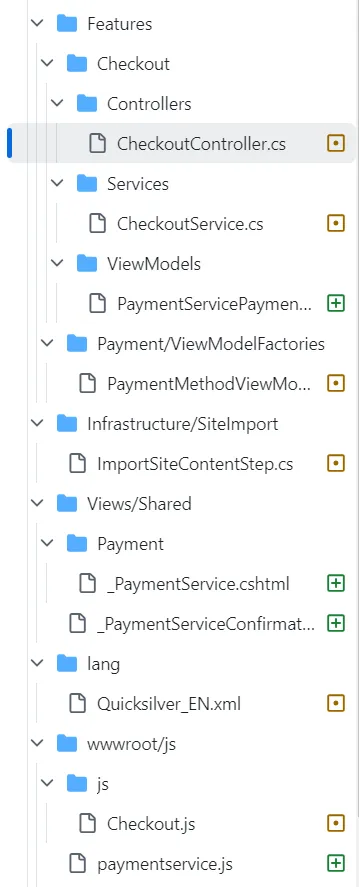
Code excerpts from the modified files
- lang/Quicksilver_EN.xml
<ProcessingPaymentFailure>Failed to process your payment.</ProcessingPaymentFailure>
</Errors>
<Methods>
    <PaymentService>
        <Labels>
            <CreditCardFirstName>First name:</CreditCardFirstName>
            <CreditCardLastName>Last name:</CreditCardLastName>
            <CreditCardNumber>Credit card number:</CreditCardNumber>
            <CreditCardSecurityCode>Security code:</CreditCardSecurityCode>
            <ExpirationMonth>Expiration month:</ExpirationMonth>
            <ExpirationYear>Expiration year:</ExpirationYear>
        </Labels>
    </PaymentService>
    <CashOnDelivery>
        <Description>You pay for your order when picking up your delivery at your local post office.</Description>
    </CashOnDelivery>
</Methods>- Features/Checkout/Controllers/CheckoutController.cs
if (paymentMethod.SystemKeyword.Equals("PaymentService", StringComparison.OrdinalIgnoreCase)) {
  var payment = Cart.GetFirstForm().Payments.FirstOrDefault() as PaymentServicePayment;
  if (payment != null && payment.Status.Equals(PaymentStatus.Pending.ToString(),
      StringComparison.OrdinalIgnoreCase)) {
    return BadRequest(new PaymentServicePaymentViewModel(payment, Cart));
  } else {
    var message = string.Join(',', ModelState.SelectMany(x => x.Value.Errors.Select(y =>
      y.ErrorMessage)));
    return BadRequest(message);
  }
}- Features/Checkout/Services/CheckoutService.cs
using EPiServer.Commerce.Bolt;
using EPiServer.Commerce.Order;
using EPiServer.Commerce.Order.Payments.Tokenization;
using EPiServer.Commerce.PaymentService;
using EPiServer.Core;
using EPiServer.Data;
using EPiServer.Framework.Localization;

// ...

if (additionalPaymentData.TryGetValue("paymentData", out var paymentData)) {
  payment.Properties["additionalPaymentData"] = paymentData;
}

if (payment is PaymentServicePayment paymentServicePayment) {
  // Support both PascalCase (new Checkout SDK) and lowercase (legacy) keys
  if (additionalPaymentData.TryGetValue("transactionToken", out var transactionToken)) {
    paymentServicePayment.TransactionToken = transactionToken;
  } else if (additionalPaymentData.TryGetValue("token", out var token)) {
    paymentServicePayment.TransactionToken = token;
  }

  if (additionalPaymentData.TryGetValue("browserInfo", out var browserInfo)) {
    paymentServicePayment.BrowserInfo = browserInfo;
  }
}

if (payment is BoltPayment boltPayment) {
  if (additionalPaymentData.TryGetValue("token", out var token)) {
    // ...
  }
}

// ...

{
  modelState.AddModelError("",
    _localizationService.GetString("/Checkout/Payment/Errors/ProcessingPaymentFailure") + ex.Message);
} catch (Exception ex) {
  modelState.AddModelError("",
    _localizationService.GetString("/Checkout/Payment/Errors/ProcessingPaymentFailure") + ex.Message);
}
return null;- Views/Shared/Payment/_PaymentService.cshtml
@using EPiServer.Commerce.PaymentService

@* ... *@

@* Load Spreedly Checkout SDK with Subresource Integrity *@
<script src="@SpreedlyConstants.CheckoutSdkUrl"
        type="text/javascript"
        charset="utf-8"
        crossorigin="anonymous"
        integrity="@Html.Raw(SpreedlyConstants.CheckoutSdkIntegrity)"
        async>
</script>

<script type="text/javascript" src="/js/paymentservice.js" defer></script>

<script type="text/javascript">
  // Wait for Spreedly Checkout SDK and fetch auth parameters
  (function waitForSpreedly() {
    if (typeof SpreedlyHostedFields !== 'undefined' && typeof initPaymentServiceCheckout === 'function') {
      fetch('/api/paymentservice/spreedly/auth')
        .then(function (response) {
          if (!response.ok) {
            throw new Error('Failed to fetch Spreedly auth parameters');
          }
          return response.json();
        })
        .then(function (authParams) {
          initPaymentServiceCheckout(authParams);
        })
        .catch(function (error) {
          // ...
        });
    } else {
      setTimeout(waitForSpreedly, 50);
    }
  })();
</script>- wwwroot/js/paymentservice.js
function initPaymentServiceCheckout(authParams) {
  // Store environment key for 3DS lifecycle
  spreedlyEnvironmentKey = authParams.environmentKey;

  // Initialize Checkout SDK with full authentication parameters
  spreedlySDK = new SpreedlyHostedFields({
    environment_key: authParams.environmentKey,
    nonce: authParams.nonce,
    timestamp: authParams.timestamp,
    certificate_token: authParams.certificateToken,
    signature: authParams.signature
  });

  // Mount payment fields
  spreedlySDK.inAppElements({
    number: { containerId: 'spreedly-number' },
    cvv: { containerId: 'spreedly-cvv' }
  });

  // Token generated event
  spreedlySDK.on('tokenGenerated', function (response) {
    var tokenizedPaymentMethod = response && response.tokenResponse && response.tokenResponse.payment_method;
    var token = tokenizedPaymentMethod && tokenizedPaymentMethod.token;
    // ...
    document.getElementById("additionalPaymentData[0].Key").value = "transactionToken";
    document.getElementById("additionalPaymentData[0].Value").value = token;
    // ...
  });

  // ...

  function getBrowserInfo() {
    // Checkout SDK uses serializeBrowserInfo global function
    return serializeBrowserInfo("04", "text/html,application/xhtml+xml,application/xml;q=0.9,*/*;q=0.8");
  }

  // ...

  // Checkout SDK uses SpreedlyThreeDSLifecycle constructor with callbacks
  const lifecycle = new SpreedlyThreeDSLifecycle({
    environmentKey: spreedlyEnvironmentKey,
    hiddenIframeLocation: "spreedly-device-fingerprint",
    challengeIframeLocation: "spreedly-challenge",
    transactionToken: transactionToken,
    challengeIframeClasses: "fitToModal",
    callbacks: {
      onChallenge: function () { /* show the challenge modal */ },
      onSuccess: function () { /* hide the modal, then complete the order */ },
      onError: function () { /* hide the modal, then show an error */ }
    }
  });

  lifecycle.start();
}

function submitPaymentForm(e) {
  // ...
  // Submit to Checkout SDK
  spreedlySDK.submit(fields);
}- Infrastructure/SiteImport/ImportSiteContentStep.cs
// Earlier in file
public class SomeClass {
  public void SomeMethod() {
    // ... other code ...

    "EPiServer.Commerce.Bolt.BoltPayment, EPiServer.Commerce.Bolt",
    "EPiServer.Commerce.Bolt.BoltGateway, EPiServer.Commerce.Bolt",
    false,
    0,
    allMarkets,
    language,
    workingDto);

  AddPaymentMethod(Guid.NewGuid(),
    "PaymentService",
    "PaymentService",
    "PaymentService Payment methods implementation.",
    "EPiServer.Commerce.PaymentService.PaymentServicePayment, EPiServer.Commerce.PaymentService",
    "EPiServer.Commerce.PaymentService.PaymentServiceGateway, EPiServer.Commerce.PaymentService",
    false, 0, allMarkets, language, workingDto);
  } // closes SomeMethod()
} // closes SomeClass