Optimizely Commerce Connect API overview
6 min
Note Sample code used in this article is taken from Quicksilver templates. The Quicksilver Commerce Connect sample site and installation instructions can be downloaded from GitHub.
Prerequisites
For environment settings, see Install and configure the native integration package.
The Main Flows
The following diagram illustrates how Optimizely Product Recommendations operates in both tracking modes:
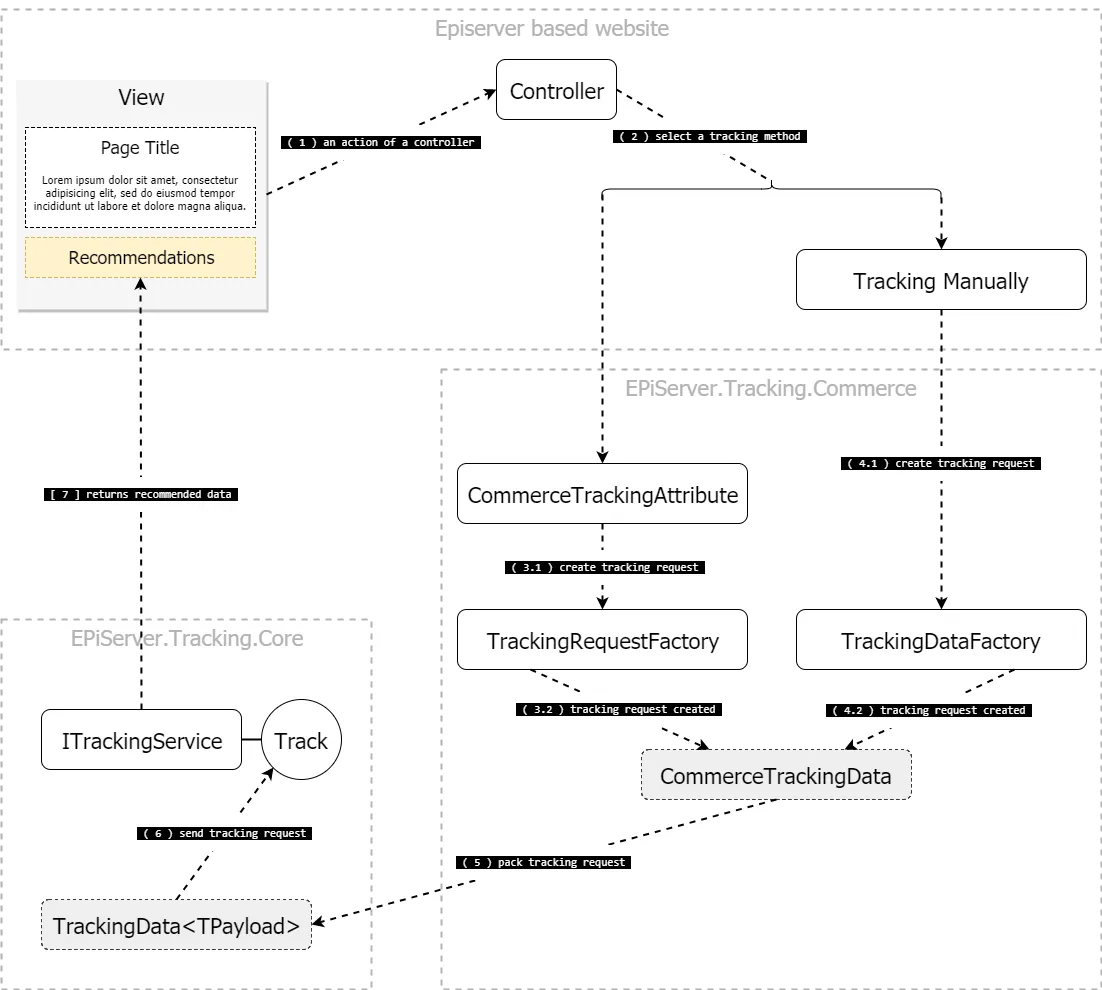
episerver-personalization.png
Integration API
Server-Side
- The EPiServer.Tracking.Core package
- The EPiServer.Tracking.Core.ITrackingService interface.
- The EPiServer.Tracking.Commerce package
- The EPiServer.Tracking.Core.TrackingServiceExtensions class.
- The EPiServer.Tracking.Commerce.CommerceTrackingAttribute class.
- The EPiServer.Tracking.Commerce.TrackingDataFactory class.
Client-Side
- The _EPiServer.Personalization.Commerce_package
- The epiRecommendations JavaScript object. Use this to send a tracking request with client-collected tracking data and render the tracking response.
- The TrackingDataFactory JavaScript object. Collects tracking data from the client.
Marking Clicks
- If a user clicks a recommended item, the click must be tracked to generate useful recommendations. To get information about which recommendation triggered the current request, use the EPiServer.Tracking.Commerce.IRecommendationContext interface.
- The Quicksilver template includes a class, EPiServer.Reference.Commerce.Site.Features.Recommendations.Services.RecommendationContext, that implements the above interface for tracking clicks on recommended products.
Preparation
Define Recommendation Layout on a Page
To render recommendations, create four sections on a page: upper, left, right, and bottom.
- recommendations-upper
- recommendations-left
- recommendations-right
- recommendations-bottom
Based on their CSS classes (listed above), recommendations are rendered to the upper, left, right, and bottom areas of a page's main content.
In Views/Shared/_Layout.cshtml, add 4 {''} tags, one for each section, as shown below...
<div class="recommendations recommendations-upper"></div>
<div class="recommendations recommendations-left"></div>
<div class="recommendations recommendations-right"></div>
<div class="recommendations recommendations-bottom"></div>
to the current layout structure.
@{ Html.RenderAction("Index", "Navigation"); }
<div class="quicksilver site-wrapper">
    <div class="main-area">@RenderBody()</div>
    <div class="recommendations recommendations-upper"></div>
    <div class="recommendations recommendations-left"></div>
    <div class="recommendations recommendations-right"></div>
    <div class="recommendations recommendations-bottom"></div>
</div>
@{ Html.RenderAction("Index", "Footer"); }