Statistical significance notifications
Statistical significance notifications tell you when a metric on your experiment reaches statistical significance. Optimizely watches every metric on the results page and notifies the users you choose by email and Slack. You can use statistical significance notifications to act on a result as soon as it becomes statistically reliable. Statistical significanceStatistical significance, or stat sig, measures how unusual your results would be if the variation and the baseline performed identically.
Guardrail alerts serve a different purpose. A guardrail alert watches one metric against a threshold you define. A statistical significance notification covers every metric and uses the experiment threshold rather than a per-metric threshold. See Guardrail alerts.
How statistical significance notifications work
Enable notifications for one experiment and select users who receive them.
While the experiment runs, Optimizely evaluates each metric against your statistical significance threshold. When a variation reaches significance for a metric, Optimizely notifies the recipients at the next scheduled check. Checks run on a schedule rather than continuously. A notification arrives at the first check after a variation reaches significance.
Optimizely does not declare a variation statistically significant or update the Confidence IntervalConfidence Interval until your experiment meets specific criteria for visitors and conversions. These criteria are different for experiments using numeric and binary metricsmetrics.
- Numeric metrics (such as revenue) – Do not require a specific number of conversions, but require 100 visitors or sessions in the variations.
- Binary metrics – Require at least 100 visitors or sessions and 25 conversions in both the variation and the baseline before Optimizely declares a winner.
The following behavior applies:
- Coverage – Optimizely watches every metric on the results page, including metrics without a guardrail threshold.
- Frequency – Optimizely sends one notification for each combination of metric and variation. Optimizely does not notify again when the metric stays significant on later checks. See Alert frequency.
- Scope – Optimizely applies the setting to one experiment and leaves every other experiment unchanged.
- Threshold – Optimizely measures significance against your statistical significance threshold. A change to the threshold applies to every running experiment immediately. Lowering it makes metrics above the lowered level significant on the next check.
Optimizely evaluates significance on the default results view, with no segments or date filters applied. A segmented view reports its own significance, which differs from the value that triggered the notification.
Supported statistical analysis methods
Notification support depends on the statistical analysis method you choose during experiment setup. The Stats engine setting names the method the experiment uses. To check it, open the Summary tab and expand Advanced options. See New A/B Results page Summary tabNew A/B Results page Summary tab.
Statistical analysis method | Notification support | Reason |
|---|---|---|
Sequential (Optimizely Stats Engine)Sequential (Optimizely Stats Engine) | Supported | Optimizely evaluates significance continuously, so a result holds as soon as it arrives. |
BayesianBayesian | Supported | Optimizely evaluates chance to beat continuously, which serves the same role as the significance value. |
Frequentist (Fixed Horizon)Frequentist (Fixed Horizon) | Not supported | Optimizely evaluates significance at the end of a planned run rather than continuously. |
Chance to beat is the probability that a variation performs better than the baseline. For a Bayesian experiment, Optimizely compares it against your threshold in place of a significance value.
For the differences between the three methods, see Statistical analysis methods overviewStatistical analysis methods overview.
Configure statistical significance notifications
Confirm the following before you enable statistical significance notifications:
- The experiment uses the Sequential (Optimizely Stats Engine) or Bayesian method.
- The experiment is running.
To enable notifications, complete the following steps:
- Open the experiment results page and go to the Summary tab.
- Click Advanced options.
- Turn on Alert when Statistical significance is reached.
- Add the users you want to notify in the Recipients field.
- Click Save.
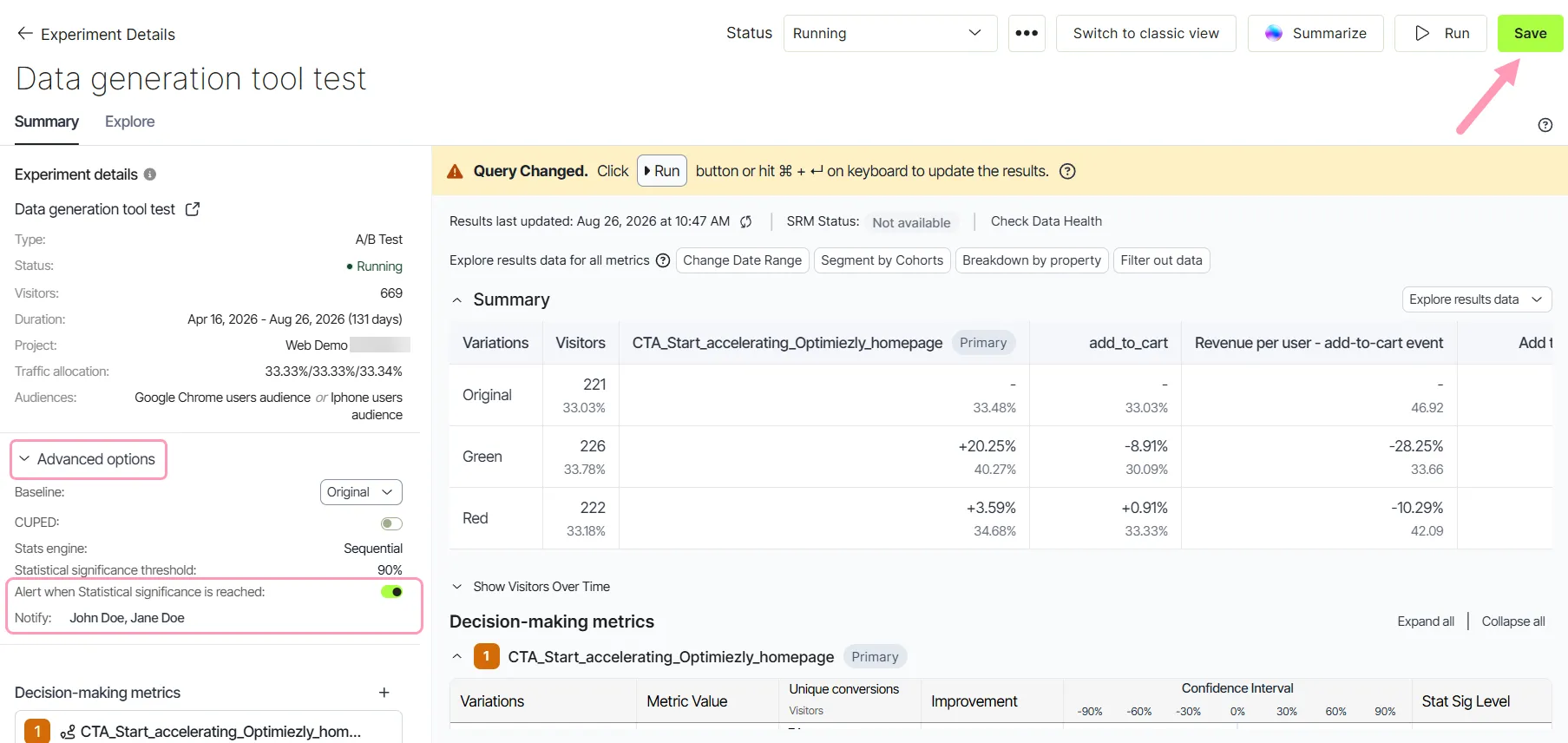
Optimizely notifies the recipients when a metric reaches significance for a variation.
How you receive notifications
Optimizely sends statistical significance notifications by email to the recipients you select, and to Slack if Slack is configured for the project. To configure Slack, see Slack notificationsSlack notifications.
Change or turn off notifications
To change the recipient list or stop notifications, complete the following steps:
- Open the experiment results page and click Advanced options.
- Add or remove recipients, or turn off Alert when Statistical significance is reached.
- Click Save.
Turning the setting off stops future notifications for that experiment. Notifications already sent remain in the recipients' inboxes.
Notifications for every experiment in a project
Statistical significance notifications apply to one experiment. To subscribe at the project level instead, see Manage email notificationsManage email notifications.
Interpret a notification
A notification reports that a metric crossed your statistical significance threshold. It is not an instruction to conclude the experiment or ship the variation.
Open the Summary tab to see the numbers behind the result. The results page reports Improvement, Confidence Interval, and Stat Sig Level for each variation. See New A/B Results page Summary tabNew A/B Results page Summary tab.
Check the direction of the improvement before you act. A guardrail metric that turns significant against the variation is a reason to stop rather than to ship.
To decide whether to act on a significant result, see the following articles:
- How long to run an experimentHow long to run an experiment – Covers the run length a reliable result needs.
- Use minimum detectable effect to prioritize experimentsUse minimum detectable effect to prioritize experiments – Covers whether an improvement is large enough to matter.
- False discovery rate controlFalse discovery rate control – Covers how Optimizely handles the error rate across many metrics and variations.