Tax jurisdictions
1 min
Tax jurisdictions are the foundational building blocks of your tax configuration. Define individual jurisdictions before you assign them to products, transactions, or jurisdiction groups. Common scenarios include:
- Precise geographic targeting – Define tax applicability down to the city, district, county, or zip code range so that tax rules apply only where legally required.
- Multi-level tax authority compliance – Many locations require tax collection at multiple levels (state, county, city). Creating a separate jurisdiction for each authority lets you stack them accurately.
- Custom geocoding – When your system uses a third-party tax engine or mapping service, a GeoCode ties your jurisdiction definition to that external system's identifier.
- Zip code range scoping – Some tax districts do not align neatly with city or county boundaries. The zip code range fields let you target an irregular district precisely.
Go to Settings > Tax Jurisdictions.
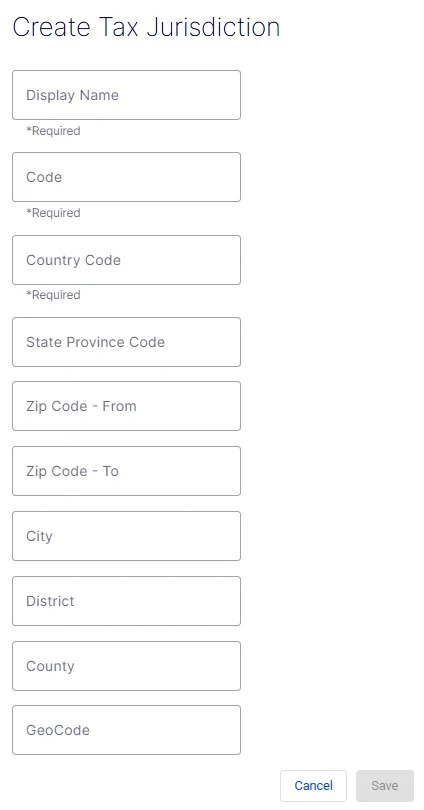
The Create Tax Jurisdiction form defines a single taxing authority and the geographic boundaries within which it applies. Each jurisdiction you create can then be added to a jurisdiction group or referenced directly in tax rules.
- Display Name – A required free-text field for the human-readable label of the jurisdiction. This name displays throughout the UI wherever the jurisdiction is referenced (for example, California – GeneralSales).
- Code – A required free-text field for the unique programmatic identifier used in API calls and integrations. It should be concise and free of spaces (for example, CA-GENERAL).
- Country Code – A required field specifying the country to which this jurisdiction belongs. Use standard ISO 3166-1 alpha-2 codes (for example, US, CA, GB).
- State Province Code – An optional field for the state or province within the specified country. Use standard abbreviations (for example, CA for California, MA for Massachusetts).
- Zip Code - From – An optional field defining the start of a zip code range. Use together with Zip Code - To to restrict the jurisdiction to a specific postal range.
- Zip Code - To – An optional field defining the end of a zip code range. Leave blank if the jurisdiction applies to an entire state or country rather than a specific postal band.
- City – An optional field to restrict the jurisdiction to a specific city within the state or province.
- District – An optional field for a named tax district that does not correspond to a standard city or county boundary (for example, a special transit or improvement district).
- County – An optional field to restrict the jurisdiction to a specific county within the state or province.
- GeoCode – An optional field for an external geographic identifier used by third-party tax engines or mapping services to match this jurisdiction to their internal records.
- Cancel – Discards all entered data and exits the form without creating a jurisdiction.
- Save – Submits the form and creates the jurisdiction. The button is disabled (grayed out) until all required fields – Display Name, Code, and Country Code – are filled in.