Example – Create audience criteria
(Thanks to Ted and Gustaf for this example.)
This example builds a custom audience criterion that checks whether a specific cookie exists in the visitor's browser. A common use case is identifying returning customers who have previously completed a purchase.
The example follows these steps:
- Create the settings and criterion classes
- Implement the settings class
- Implement the criterion class
- Test the criterion
Create the settings and criterion classes
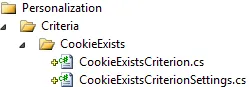
Audience criteria require a settings class and a criterion class. The settings class persists editor-facing configuration. The criterion class contains the logic that determines whether a visitor belongs to the audience.
Create the two classes in a suitable folder structure:
Implement the settings class
The settings class stores the cookie name that the criterion evaluates. The only required configuration for this criterion is the name of the cookie to detect.
- Make the CookieExistsCriterionSettings class inherit the CriterionModelBase class:
public class CookieExistsCriterionSettings : CriterionModelBase- Add a public property to let editors specify the cookie name:
[Required]
public string CookieName {
  get;
  set;
}- (Optional) Implement the IValidateCriterionModel interface for custom validation logic when a criterion is saved. The Validate method customizes validation before saving a criterion for an audience. The abstract CriterionModelBase class requires a Copy() method implementation. For simple value types, return a shallow copy as shown. For details, go to Create custom audience criteria.
public override ICriterionModel Copy() {
  return ShallowCopy();
}
The following code shows the complete CookieExistsCriterionSettings class:
public class CookieExistsCriterionSettings: CriterionModelBase {
  [Required]
  public string CookieName {
    get;
    set;
  }
  public override ICriterionModel Copy() {
    return ShallowCopy();
  }
}
Implement the criterion class
The criterion class evaluates the HTTP request to determine whether the specified cookie exists.
- Make the CookieExistsCriterion class inherit the abstract CriterionBase class with the settings class as the type parameter:
public class CookieExistsCriterion : CriterionBase<CookieExistsCriterionSettings>- Add a VisitorGroupCriterion attribute to define the category, name, and description. For additional attribute properties, go to Create custom audience criteria:
[VisitorGroupCriterion(
  Category = "Technical",
  DisplayName = "Cookie Exists",
Description = "Checks if a specific cookie exists")]- Implement the IsMatch() method to check whether the specified cookie exists in the request. Access the criterion configuration through the Model property:
public override bool IsMatch(IPrincipal principal, HttpContextBase httpContext) {
  return httpContext.Request.Cookies[Model.CookieName] != null;
}
The complete criterion class:
[VisitorGroupCriterion(
  Category = "Technical",
  DisplayName = "Cookie Exists",
  Description = "Checks if a specific cookie exists")]

public class CookieExistsCriterion: CriterionBase<CookieExistsCriterionSettings> {
  public override bool IsMatch(IPrincipal principal, HttpContextBase httpContext) {
    return httpContext.Request.Cookies[Model.CookieName] != null;
  }
}
📘 Note Access the criterion settings instance through the Model property.
Test the criterion
Test the criterion by creating an audience that uses the cookie criterion.
- Set the cookie name to .EPiServerLogin, the cookie created when a user logs in to Episerver:

- Select content in the editor to restrict to logged-in users:

- Select Personalized Content > Episerver User audience.
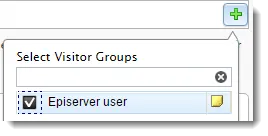
This content now displays only to users logged in to Episerver:

After publishing the page:
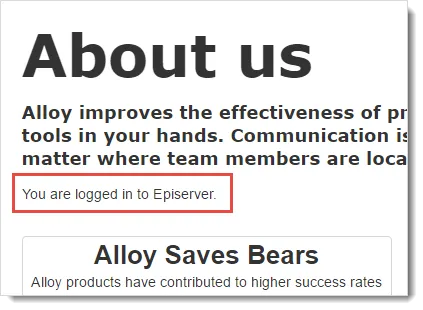
After logging out of Episerver, the personalized content no longer displays: