Experiment does not activate
- Optimizely Web Experimentation
- Optimizely Performance Edge
Are you experiencing any of the following issues? Usually, this problem has to do with activation or targeting issues.
- You started an experiment, but after an hour or more, you are still not seeing visitors or conversions come through on the results page.
- The experiment does not seem to be running on the page, and you cannot see any of the variations in your browser (outside of the editor).
- You can see variations when you use the force parameterforce parameter, but not when you view the page in your browser without the force parameter.
- Your Optimizely Web Experimentation experiment is running, and you see visitors and conversions on your Optimizely Experiment Results pageOptimizely Experiment Results page. However, you cannot see the experiment live in your browser (outside of the editor).
Note
This article may not apply if
- You see visitors but no conversions, or if results are missing for a specific variation. See Cannot see the variationCannot see the variation.
- You are troubleshooting event or metric tracking issues. See Metrics do not track correctlyMetrics do not track correctly
Check the snippet on the page
Make sure that the Optimizely Web Experimentation SnippetOptimizely Web Experimentation Snippet is on your page, as high as possible in the <head> tag, and that there is only one Optimizely Web Experimentation Snippet on the page.
Optimizely Web Experimentation works best when installed directly in the <head> tag of every page you want to test. Having more than one Optimizely Web Experimentation Snippet on the page, even if it is for a different project, can create complications.
Make sure your experiment is running, and you are bucketed into the variation
If your snippet is implemented correctly, check whether the experiment is active and you are bucketed into the correct variation.
- Make sure that your experiment is in Running status on your experiment dashboard. To determine whether an experiment is running, go to the URL where you are running the experiment, and then open your browser's consoleopen your browser's console. See The difference between publish, start, and pause.
- To see if you were given a variation in Optimizely Web Experimentation, see the JavaScript API in Optimizely Web Experimentation and Optimizely Performance Edge.
- Enter optimizely.get('state').getVariationMap() into the console. This returns an object containing the experiment IDs that were activated at some point in the past, along with the variation ID you were given. This list is not indicative of active experiments on the page.
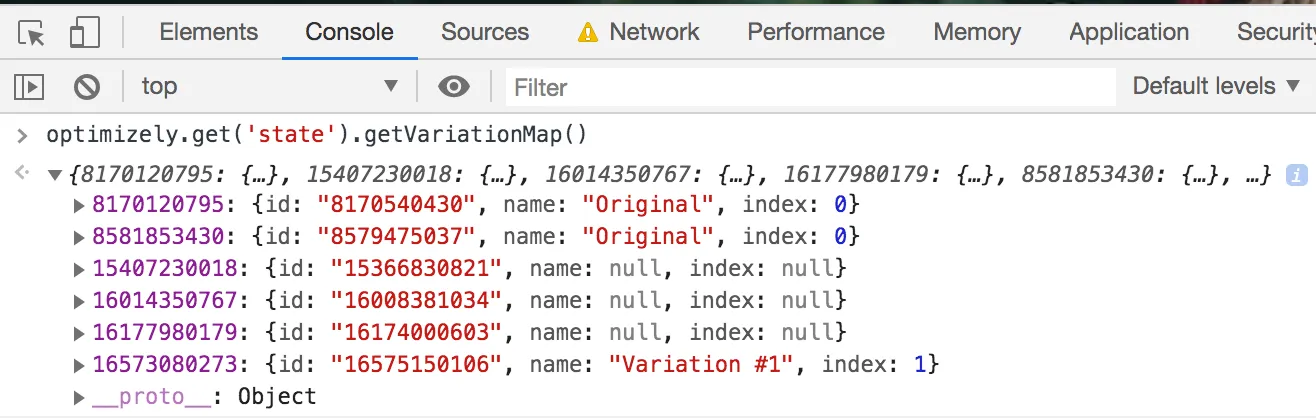
- Enter optimizely.get('state').getActiveExperimentIds() into the console. This returns an object with the experiments IDs currently active on the page you are on. Check to see if your experiment ID is present in this list.
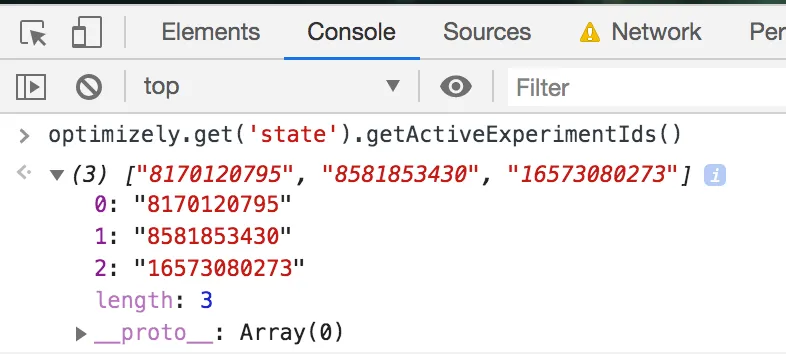
To find your experiment, variation, or event IDs, visit the API NamesAPI Names section of your experiment.
If you have chosen to mask descriptive names within your project settingsproject settings, then you will not see the name of the variation you were given, for example, Original and Variation #1, and you instead only see the variation ID.
Note
If there are multiple active experiments running on the same target URLs, you may want to prevent them running simultaneously which can cause interaction effects that pollute your results set. This can be done by making the experiments mutually exclusivemutually exclusive.
If you have verified that the experiment is currently active and the correct variation was given to you but this has not resolved your issue, continue to the next section.
Check for targeting issues
Verify that the following targeting conditions are set correctly: audience conditionsaudience conditions, URL TargetingURL Targeting conditions, or traffic allocationtraffic allocation. Double-check each of these in Optimizely Web Experimentation for obvious errors that prevent you from seeing the experiment. Test your URL targeting conditions.
- Use the Optimizely Web Experimentation LogOptimizely Web Experimentation Log to show you Optimizely Web Experimentation's actions and decisions. Append the ?optimizely_log=info query parameter to your URL to read the logread the log. Then, reload the page.
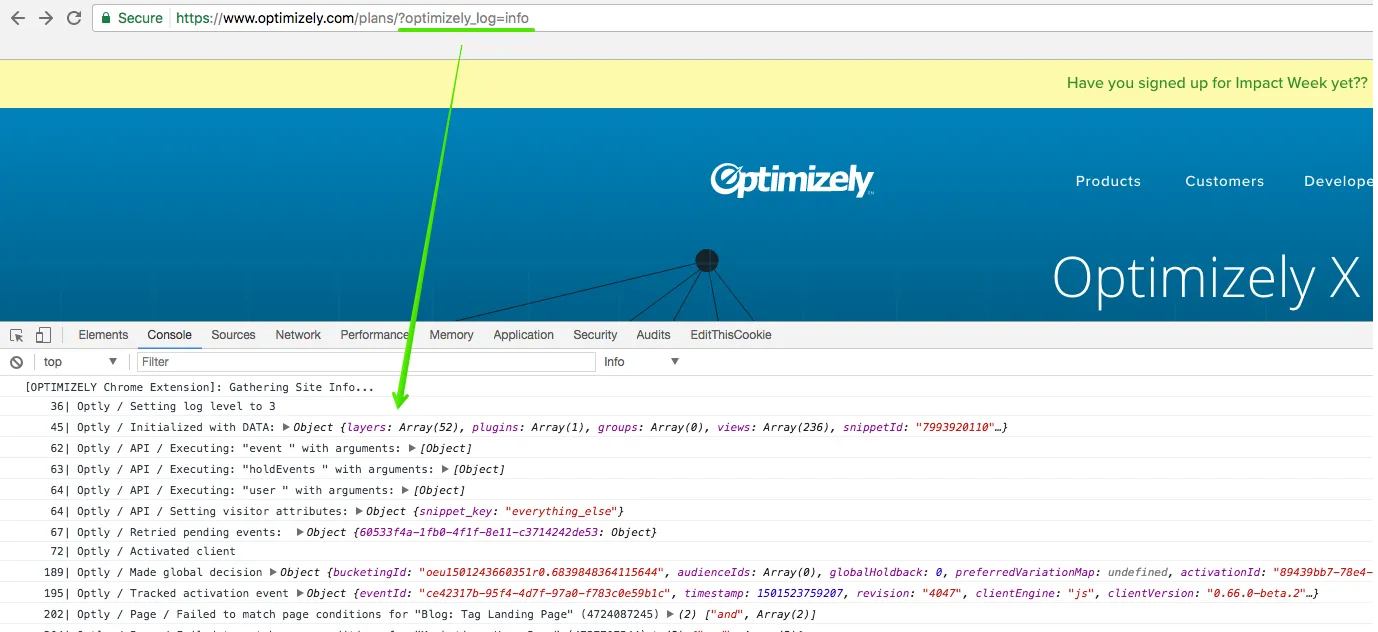
/hc/en-us/articles/4410284275725-jQuery-and-the-variable/hc/en-us/articles/4410284275725-jQuery-and-the-variable
- Filter the log by your Experiment ID.
- Paste your Experiment ID into the search field:
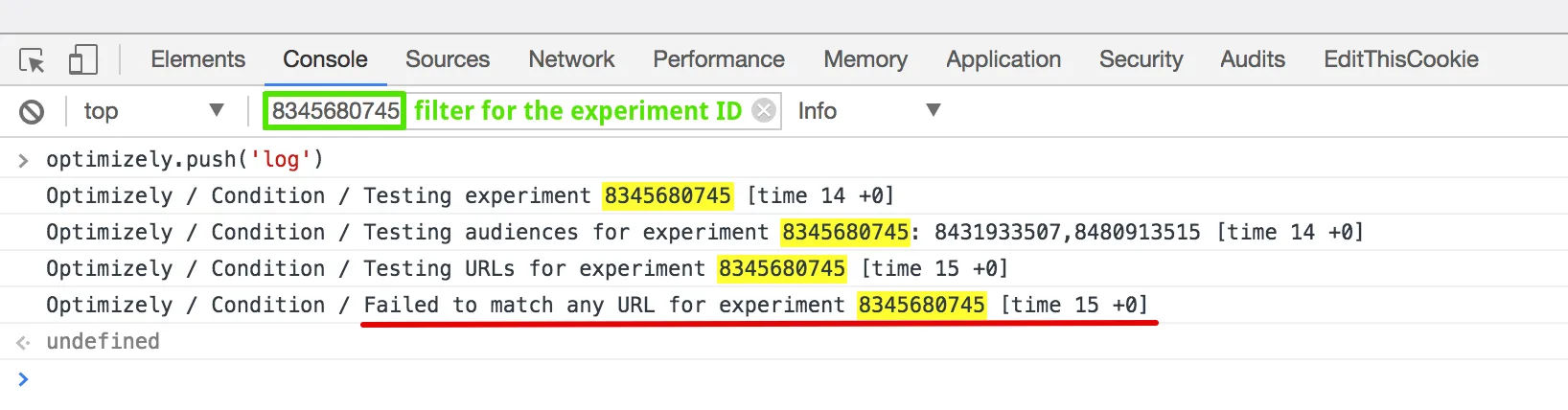
- Check whether the log reveals any Condition errors—in other words, that you failed to match URL, Audience, or Traffic Allocation conditions. If you failed conditions, and you do not think you should be failing them, there is a problem with your URL Targeting, Audience, or Traffic Allocation configuration. Change them. If you passed the conditions but you still do not see your experiment, go to the next section about other issues.
Note
Optimizely Web Experimentation updated the client, so you must append the optimizely_log parameter, then reload the page to see the log. This minimizes the logging overhead for visitors and pageviews that do not request the log.
Check for other issues
If you do not experience targeting issues, then one of the following other issues may be causing a problem:
- Are you using manual or conditional activation – Manual and conditional activationManual and conditional activation require specific visitor actions to take place for the experiment to activate. What actions are necessary to activate your experiment, and have you taken those necessary steps? Use Optimizely Web Experimentation's log to see where your experiment may not be meeting these conditions by searching the log for your experiment ID.
- Is your site dynamic – Does your single-page application use client-side frameworks like Angular or React? If so, Optimizely Web Experimentation might not be initialized properly when the next page is rendered. See Dynamic websites and single-page applicationsDynamic websites and single-page applications.
- Is jQuery defined – Optimizely Web Experimentation does not rely on jQuery to work properlydoes not rely on jQuery to work properly. However, if you are choosing to code in jQuery, are you using the jQuery library provided by Optimizely Web Experimentation within your project settingsproject settings, or is the library defined in your native side code? You need to ensure the correct scopescope is used.