Real-Time Audiences for Feature Experimentation segment qualification methods for the JavaScript SDK v6+
Prerequisites
You must enable and configure Real-Time Audiences for Feature Experimentation before fetching qualified segments and checking if the user is qualified for the given audience segment.
Minimum SDK version
v6.0.0+
For versions 5.3.5 and below, see JavaScript (Browser) SDK or JavaScript (Node) SDK. See the SDK compatibility matrix documentation for a list of current SDK releases and the features they support.
fetchQualifiedSegments
Fetches all qualified audience segments for the user context.
fetchQualifiedSegments is a method of the UserContext object. See OptimizelyUserContext for details.
Parameters
The following table describes the parameters for the fetchQualifiedSegments method:
Parameter | Type | Description |
|---|---|---|
options (optional) | OptimizelySegmentOption[] | A set of options for fetching qualified segments from ODP. |
Returns
This method returns a Promise<boolean>, which resolves with true if segments are fetched, and false otherwise.
Note You can read and write directly to the qualified segments array. This lets you bypass the remote fetching process from ODP or use your own fetching service. This can be helpful when testing or debugging.
Example
The following is an example of calling the fetchQualifiedSegments method and accessing the returned completion object:
const attributes = { "app_version": "1.3.2" };

const user = optimizely.createUserContext("fs-id-123", attributes);

const asyncFunction = async () => {
  const fetched = await user.fetchQualifiedSegments()
  console.log(fetched) // true
  console.log(user.qualifiedSegments) // Updated qualified audience segments for the target user
}
// Call user.decide() to get a feature flag decision for a user. Each decision includes whether the flag is enabled and which variation the user receives.
After the audience segments are fetched, they are cached. This means that if you are requesting the segments again (when new user contexts are created), the audience segment information can be retrieved from the cache instead of being fetched again from the remote ODP server.
The cache is used for the fetchQualifiedSegments call. This method is called on the user context (the user context is fixed, including the real-time audiences the user qualifies for).
The cache only applies when calling the fetchQualifiedSegments call. If you set the cache timeout to 0, the cache is disabled. Optimizely uses the LRU algorithm, so the oldest record is bumped out when the maximum size is reached. If there is a cache miss upon the method call, Optimizely makes a network request.
If you would like to bypass caching, you can add the following options to your options array:
- OptimizelySegmentOption.IGNORE_CACHE – Bypass segments cache for lookup and save.
- OptimizelySegmentOption.RESET_CACHE – Reset all segments cache.
fetchQualifiedSegments network diagram
The following diagram shows the network calls between your application, the Feature Experimentation JavaScript SDK, and the ODP server when calling fetchQualifiedSegments:
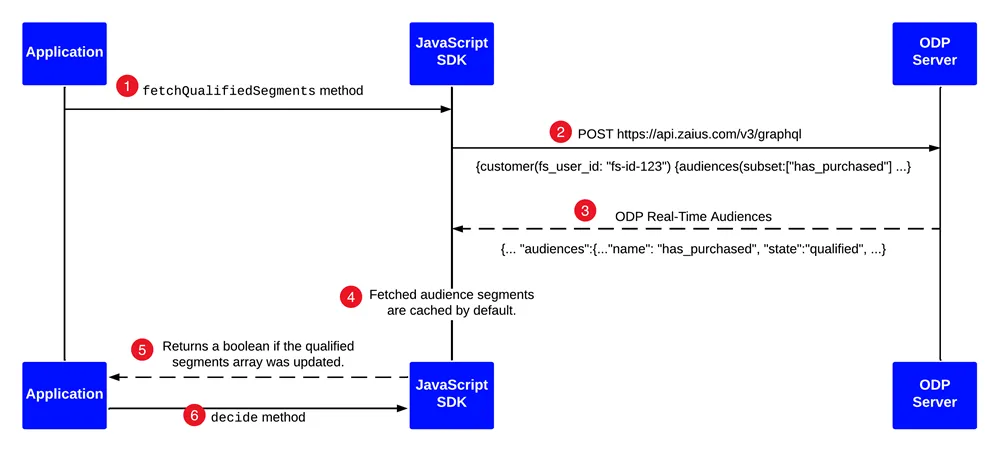
- Your application calls the fetchQualifiedSegments method.
- The Feature Experimentation JavaScript SDK makes a GraphQL call to ODP to fetch segments the user ID qualifies for.
- ODP responds with the qualified audience segments.
- The JavaScript SDK automatically caches the fetched segments mapping the user ID to the qualified segments.
- The fetchQualifiedSegments method returns a boolean if the qualified segments array was updated.
- Call the decide method to get the flag decision for a given user, a decision object that contains the flag's status (enabled or disabled), and the assigned variation key.
isQualifiedFor
Check if the user is qualified for the given segment.
Parameters
The following table describes the parameters for the isQualifiedFor method:
Parameter | Type | Description |
|---|---|---|
segment | String | The ODP audience segment name to check if the user is qualified for |
Returns
true if the user is qualified.
Example
The following is an example of whether the user is qualified for an ODP segment:
const attributes = { "laptop_os": "mac" };
const user = optimizely.createUserContext("user123", attributes);

const isQualified = user.isQualifiedFor('segment1');
console.log(isQualified); // true
Source files
The language and platform source files containing the implementation for the JavaScript SDK are available on GitHub.