Ratio metrics
- Optimizely Web Experimentation
- Optimizely Personalization
- Optimizely Performance Edge
- Optimizely Feature Experimentation
Ratio metrics are calculated metrics that let you measure the relationship between two different events in a single metric. This flexibility lets you construct advanced metrics that better reflect how your business already evaluates performance, such as revenue per add-to-cart click or feature use per account.
Unlike simple metrics, which automatically normalize by the number of users in an experiment, ratio metrics let you define a custom denominator, such as accounts or a specific event.
Using ratio metrics, you can create custom metrics by dividing one event's total count, unique count, total revenue, or total value by another event’s corresponding aggregation.
Use ratio metrics
While the primary use case for ratio metrics is based on \\( \\frac{\\text}{\\text} \\), Optimizely Experimentation also supports different configurations, such as \\( \\frac{\\text}{\\text} \\). For example, you could create a ratio metric to track the percentage of completed purchases after an add-to-cart event, using the following structure:
\\[ \\frac{\\text{Total completed purchases}}{\\text{Total add-to-cart clicks}} \\]
When to use ratio metrics
Use ratio metrics in the following scenarios:
- You need to measure efficiency or value per event, not per user.
- Your key performance indicator (KPI) is already expressed as a ratio, such as the following:
- Revenue per session.
- Average order value.
- Purchases per account.
- You want to create funnel-like metrics to analyze sequential event relationships (for example, form submissions after banner clicks).
Ratio metrics let you bring business logic into Optimizely Experimentation by tracking performance the same way your organization already does.
Calculation methodology
To calculate ratio metrics, Optimizely does the following:
- Check the denominator event – Optimizely first checks if the user completes the denominator event.
- Check the numerator events – If the denominator event occurred, Optimizely checks for numerator events within a 48-hour window after the denominator event. The numerator events must occur within 48 hours after the denominator event to be included in the ratio metric calculation.
- Aggregate values for the numerator events
- If using a value-based event (such as revenue), Optimizely sums the values of all qualifying events in the window.
- If using a count-based event, Optimizely counts each occurrence.
- Calculate the ratio per unit, then average across all qualifying units – Optimizely calculates a ratio for each individual unit (such as a user or account) by dividing the numerator value by the denominator value. It then averages these per-unit ratios across all units that qualified for the denominator event in each variation.
Note
The 48-hour window is not configurable.
Examples
Ecommerce example
For this example, you have an ecommerce website and want to track revenue per add-to-cart click on a product details page. In this scenario, you have the following two events to track:
- Purchase completion – Total revenue.
- Add to cart clicked – Total conversions.
In this example, the ratio metric is calculated as total revenue from completed purchases / total add-to-cart clicks.
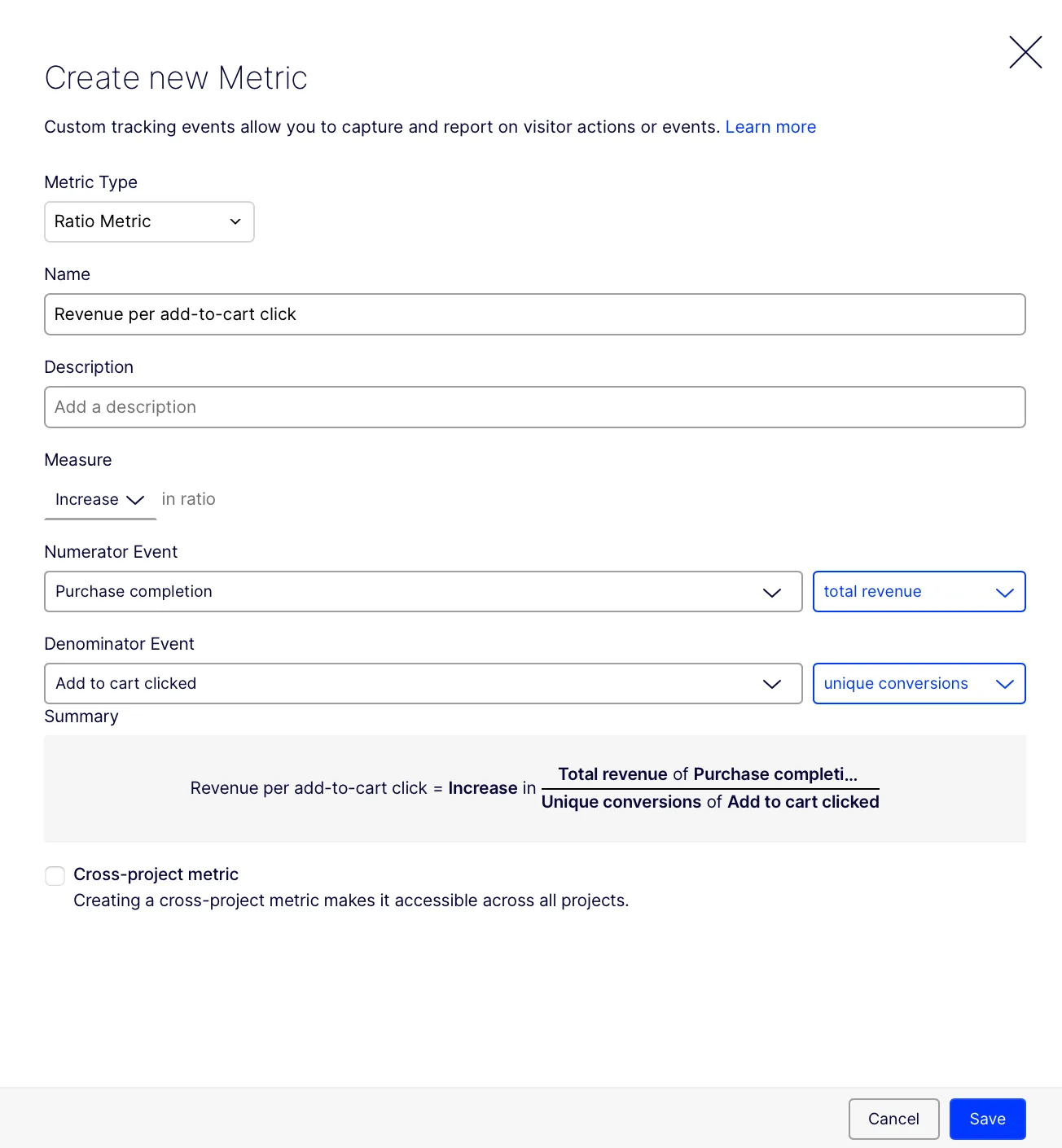
Optimizely computes this metric by completing the following:
- Checks if the user clicks add to cart (the denominator event).
- If the user qualifies, Optimizely sums the revenue from completed purchases (the numerator event) within 48 hours.
- Calculates the ratio per user and then averages across all users.
Marketing funnel example
For this example, you work at a company and want to track your marketing funnel by tracking form submissions after a user clicks on a promotional banner. In this scenario, you have the following two events to track:
- Form submissions – Total conversions.
- Promotional banner clicks – Total conversions.
In this example, the ratio metric is calculated as the total form submissions / total promotional banner clicks.
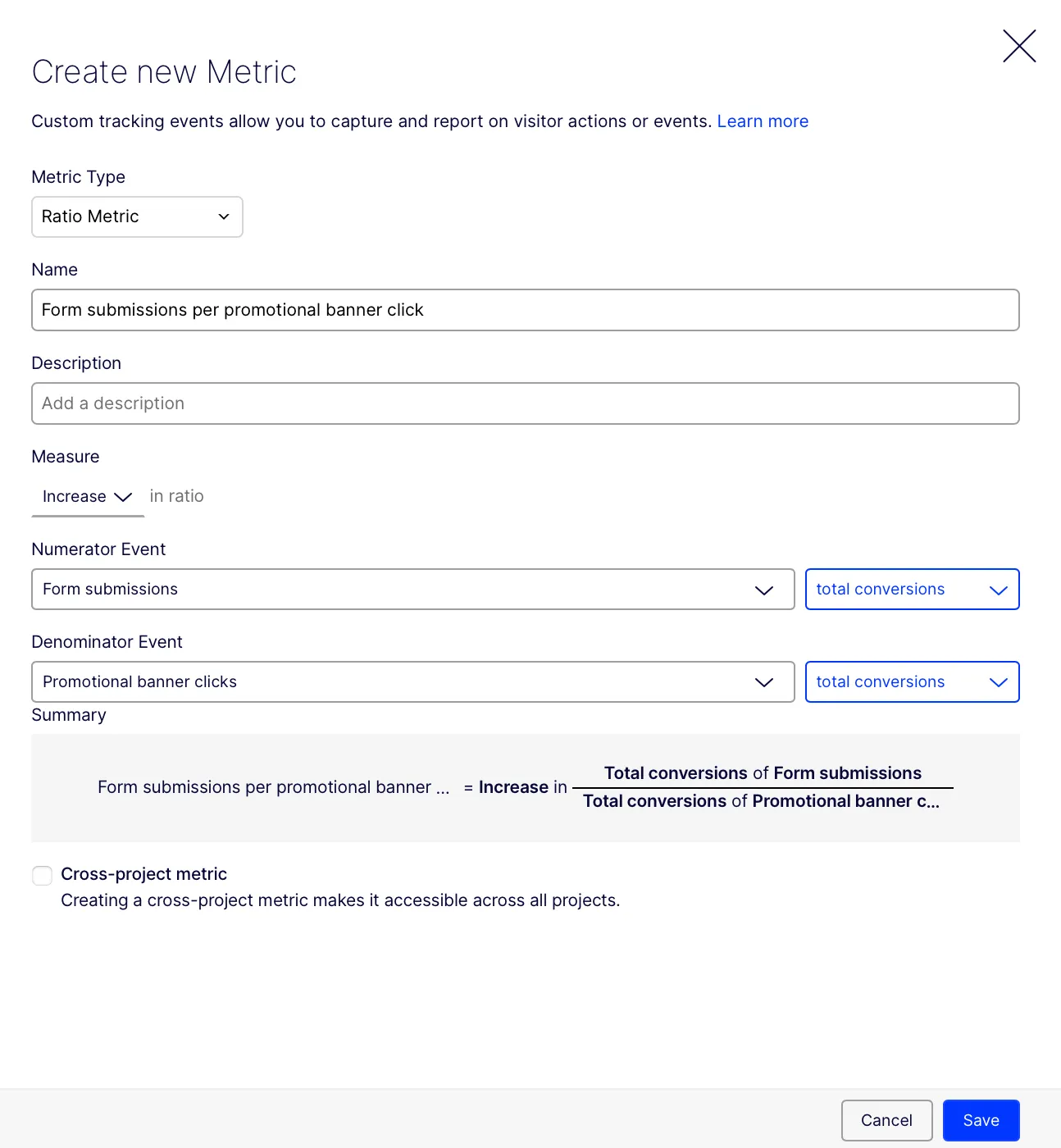
Optimizely computes this metric by completing the following:
- Identifies users who clicked the promotional banner (the denominator event). Only users who triggered this event are considered in the ratio calculation.
- For each user who clicked the banner, Optimizely counts all form submission events (the numerator event) that occurred within 48 hours of the banner click.
- Optimizely calculates the number of form submissions per banner click per user, then averages this ratio across all users who clicked the banner.
Streaming service example
In this example, you work for a streaming service, and you want to capture the household-level engagement for subscription-based platforms. In this scenario, you have the following two events to track:
- Total watch time (in minutes) – Total value
- Number of accounts – Unique conversions
In this example, the ratio metric is calculated as the total watch time / unique conversions of unique accounts.
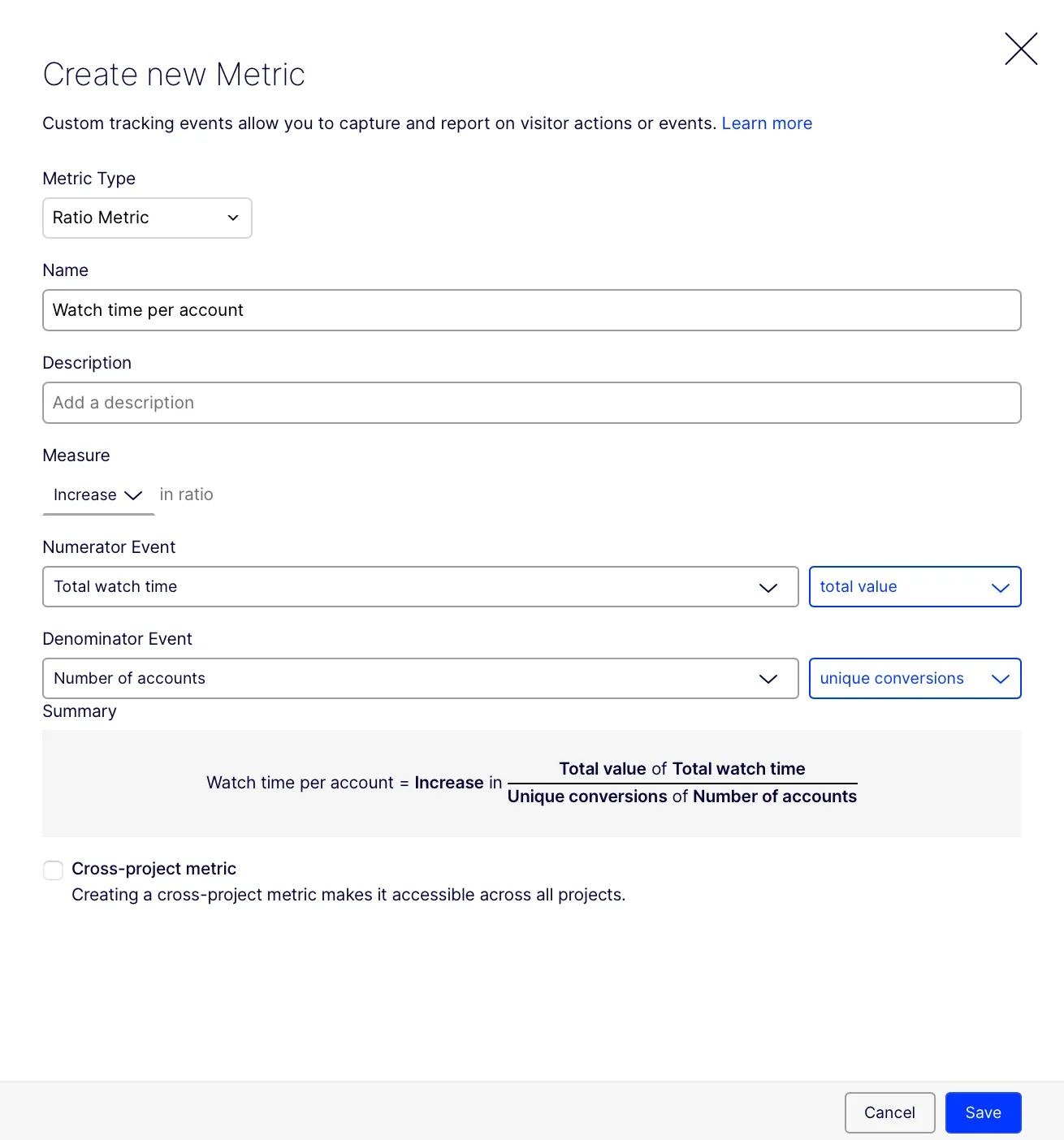
Optimizely computes this metric by completing the following:
- Checks whether each account started streaming content (the denominator event). This event is treated as a unique conversion, meaning each account is counted once when it first starts streaming during the experiment.
- For each qualifying account, Optimizely sums the total number of minutes watched across all associated users (the numerator event). Only watch time within a 48-hour window after the streaming start event is included.
- Calculates the average watch time per account by dividing the total minutes watched by the number of qualifying accounts. It then averages this value across all accounts in each variation.
Statistical methodology
When conducting experiments using ratio metrics, it is important to estimate the metric's variance to determine its statistical significance. Given that a ratio metric is a ratio of two events, Optimizely employs a first-order Taylor series approximation (often referred to as the Delta method) to approximate this variance.
For a ratio metric \\( \\hat \\) defined as \\[ \\hat = \\frac{\\sum_{i=1}^ y_i}{\\sum_{i=1}^ x_i} \\]
Where
- \\( x_i \\) represents the observed values of the denominator event.
- \\( y_i \\) represents the observed values of the numerator event.
The approximate variance of \\( \\hat \\) is calculated as
\\[ V(\\hat) \\approx \\frac \\frac{\\mu_x^2} (R^2 \\sigma_x^2 + \\sigma_y^2 - 2R\\sigma_) \\]
Where
- \\( n \\) is the sample size.
- \\( \\mu_x \\) is the mean of the denominator variable
- \\( \\sigma_x^2 \\) is the variance of \\( x \\).
- \\( \\sigma_y^2 \\) is the variance of \\( y \\).
- \\( \\sigma_ \\) is the covariance between \\( x \\) and \\( y \\).
This approximation helps in understanding the variability of the ratio metric, which is crucial for hypothesis testing. The presence of covariance (\\( \\sigma_ \\)) in the formula indicates that the two events in a ratio metric may not be independent. Instead, their values may be statistically dependent, meaning that changes in one event could be correlated with changes in the other. This dependence is captured in the variance calculation to ensure accurate statistical inferences. Optimizely's sequential testing methods were adjusted to account for this variance estimation, ensuring accurate and reliable test results.
Best practices
Ratio metrics are powerful, but require careful interpretation. Follow these best practices to ensure accuracy.
- Ratio metrics can be any type of metric – Ratio metrics can serve as your primary, secondary, or monitoring metric.
- Always include the component metrics as simple metrics – Add the numerator and denominator as simple metrics in your experiment. This helps you interpret the ratio correctly and helps with the following:
- If only one event changes drastically, the ratio metric can become skewed, potentially causing misleading conclusions.
- If the ratio remains the same, but the total counts of both events drop dramatically, it could indicate an underlying issue not apparent from the ratio metric alone.
- Choose the right metric type – Start with a simple metric when it adequately captures your goal. Use a ratio metric when a custom denominator is essential.