Configure search providers
1 min
🚧 Important This topic is for Optimizely Content Management System (SaaS) administrators, and developers with administration access rights.
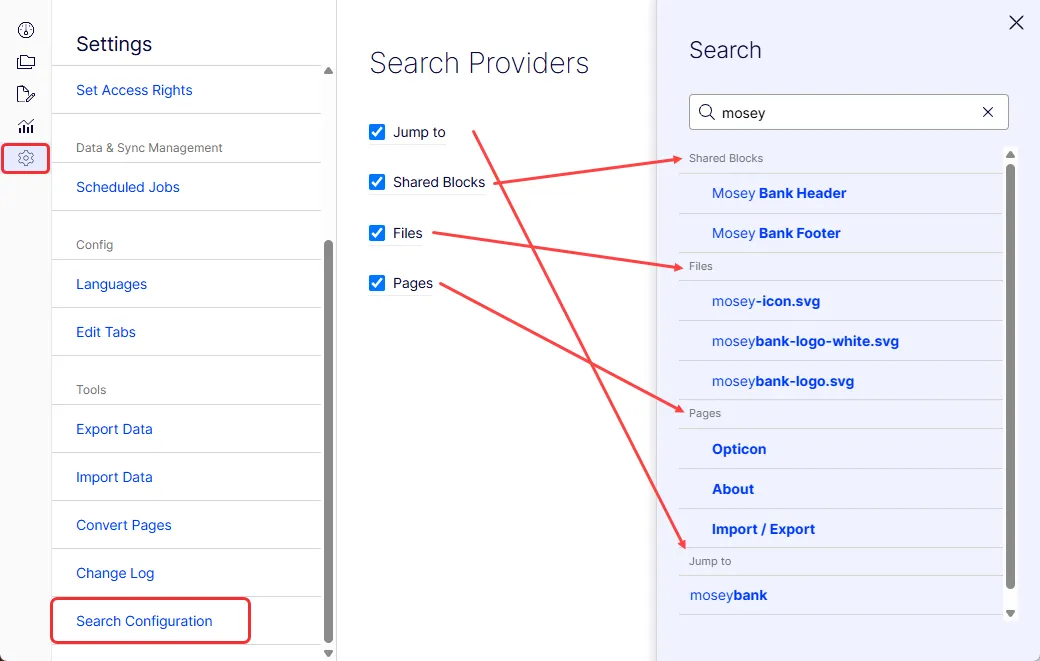
Go to Settings > Tools > Search Configuration to set the search providers for your CMS (SaaS) instance. This configuration lets you change the type of results the CMS global search bar returns.
CMS (SaaS) uses Optimizely Graph as its default internal search engine, which allows you to access the following default providers:
- Jump to – Returns menu items defined by IMenuProviderIMenuProvider.
- Blocks – Searches for CMS (SaaS) shared blocks.
- Files – Searches for CMS (SaaS) documents.
- Pages – Searches for CMS (SaaS) pages (including page content).
You can turn off a provider to exempt it from a search. Relevant search results are moved when appropriate.